Category: productivity

  • Unlock the Secrets to Transforming Your Team: 7 Proven Leadership Hacks Every Project Manager Needs to Know!

    Unlock the Secrets to Transforming Your Team: 7 Proven Leadership Hacks Every Project Manager Needs to Know!

    Effective leadership in project management goes far beyond delegating tasks and managing deadlines. It’s about inspiring your team, fostering a positive work environment, and driving collective success. One of the most powerful ways to achieve this is by leading by example. When project managers model the behaviors and attitudes they wish to see in their teams, they not only boost morale but also enhance productivity and collaboration. In this article, we’ll explore how project managers can leverage leadership techniques to motivate and engage their teams, and provide practical, actionable steps to elevate your leadership game right away.

    1. Communicate with Clarity and Transparency

    Clear communication is the foundation of good leadership. It ensures that everyone understands their role, responsibilities, and the project’s goals. But more importantly, being transparent builds trust within your team.

    Ho to do it:

    • Regularly share updates on project progress, key decisions, and any roadblocks.
    • Use tools like Slack or Microsoft Teams to maintain open communication lines.
    • Create a culture where team members feel comfortable asking questions or seeking clarification without hesitation.
    2. Empower Your Team to Make Decisions

    Micromanaging stifles creativity and lowers morale. Instead, empower your team to take ownership of their work and make decisions where appropriate. This doesn’t mean handing over complete control, but allowing autonomy where it counts.

    How to do it:

    • Establish clear guidelines and boundaries, so the team knows the scope of their decision-making power.
    • Encourage them to solve problems independently before escalating issues.
    • Celebrate their wins and provide constructive feedback when necessary.
    3. Foster a Culture of Continuous Feedback

    Feedback is essential for growth. But it’s not just about annual performance reviews. Effective leaders integrate feedback into their everyday interactions.

    How to do it:

    • Hold regular one-on-one meetings to discuss performance, challenges, and development opportunities.
    • Provide both positive reinforcement and constructive criticism.
    • Encourage peer feedback within the team to promote a learning culture.
    4. Adapt Your Leadership Style to Each Individual

    Every team member is unique, and as a leader, it’s crucial to recognize and adapt to different working styles and personalities. Some may thrive under close guidance, while others excel with minimal oversight.

    How to do it:

    • Take time to understand each team member’s strengths, weaknesses, and preferences.
    • Tailor your approach when assigning tasks or providing feedback, based on individual needs.
    • Use personality assessments like MBTI or DiSC to gain insights into your team’s dynamics.
    5. Lead by Example: Show Commitment and Accountability

    Leadership is about setting the standard. By modeling the behavior you expect from your team—whether it’s punctuality, accountability, or commitment to quality—you set the tone for the entire project.

    How to do it:

    • Take ownership of your mistakes, and don’t shy away from admitting when things go wrong.
    • Show up for your team by being present, engaged, and approachable.
    • Demonstrate resilience in the face of challenges to inspire the same in your team.
    6. Promote Collaboration Over Competition

    While healthy competition can sometimes drive performance, fostering a collaborative environment leads to better problem-solving, innovation, and team morale. Projects are about teamwork, and collaboration should be at the forefront.

    Ho to do it:

    • Encourage knowledge sharing through regular brainstorming sessions or workshops.
    • Use project management tools like Asana or Trello to keep tasks transparent and assign joint responsibilities.
    • Celebrate team wins over individual achievements, reinforcing the idea that success is a collective effort.
    7. Stay Calm Under Pressure

    High-pressure projects are inevitable, and your response sets the tone for the team. Leaders who maintain calm, rational decision-making inspire confidence in their team members, even during stressful situations.

    How to do it:

    • Practice mindfulness or breathing techniques to manage stress.
    • Take a step back to assess the situation before reacting.
    • Encourage your team to take breaks and maintain work-life balance, even in crunch times.
    Low-Hanging Fruits: Easy Tips to Implement Today
    1. Daily Stand-ups – A quick 15-minute meeting at the start of the day can provide clarity, identify roadblocks, and foster accountability.
    2. Open Office Hours – Set aside a specific time during the week when team members can come to you with questions or concerns. This increases transparency and accessibility.
    3. Celebrate Small Wins – Regularly recognize and celebrate small achievements. Whether it’s completing a task ahead of time or successfully overcoming a challenge, small celebrations boost morale.
    4. Share Responsibility – Next time a decision needs to be made, delegate it to a capable team member. This helps build confidence and ownership.
    5. Peer Feedback – Encourage team members to give feedback to one another in a constructive and supportive way. This strengthens collaboration and helps everyone improve.
    6. Lead a Retrospective – After every project or milestone, hold a short retrospective meeting to discuss what worked, what didn’t, and what can be improved. Use this as an opportunity to gather feedback and implement changes.
    7. Model Work-Life Balance – Encourage breaks and downtime, especially during high-pressure periods, and model this behavior yourself. This helps reduce burnout and keeps the team energized.

    By incorporating these leadership hacks and easy-to-implement tips into your daily routine, you’ll notice an immediate improvement in team dynamics, morale, and productivity. Leadership is an ongoing journey, but small changes today can lead to significant transformations tomorrow.

  • The Role of Emotional Intelligence in Project Management: How EQ Can Improve Communication, Decision-Making, and Team Dynamics

    The Role of Emotional Intelligence in Project Management: How EQ Can Improve Communication, Decision-Making, and Team Dynamics

    In today’s fast-paced business environment, project management isn’t just about meeting deadlines, managing budgets, or following methodologies—it’s about managing people. The ability to connect with team members, foster trust, and navigate the complexities of human emotions is critical for success. This is where emotional intelligence (EQ) comes into play.

    What is Emotional Intelligence?

    Emotional intelligence refers to the ability to recognize, understand, and manage our own emotions while being attuned to the emotions of others. It consists of five core components:

    1. Self-awareness: Recognizing one’s emotions and their impact on others.
    2. Self-regulation: Managing emotions in a healthy way and controlling impulses.
    3. Motivation: Staying committed to goals with resilience and a positive attitude.
    4. Empathy: Understanding the feelings and needs of others.
    5. Social skills: Building strong interpersonal relationships, managing conflict, and working effectively within a team.
    Why is EQ Critical in Project Management?

    While technical expertise and organizational skills are important, emotional intelligence can elevate a project manager’s ability to lead. Let’s dive into how EQ influences communication, decision-making, and team dynamics.

    1. Improved Communication

    A project manager with high emotional intelligence excels in active listening, non-verbal communication, and empathy. When you’re attuned to your team’s emotions and individual personalities, you can tailor your communication style to meet their needs. For example, some team members might need detailed instructions, while others work better with creative freedom. EQ helps you discern these needs and communicate in a way that makes everyone feel heard and valued.

    Example: In a high-stress situation, a project manager with high EQ will notice when a team member is overwhelmed, responding with empathy by offering support, adjusting deadlines, or redistributing tasks. This builds trust and keeps communication channels open, preventing small issues from escalating into larger conflicts.

    2. Better Decision-Making

    Decision-making is at the heart of project management, and it often involves managing conflicting priorities, expectations, and personalities. EQ enables project managers to approach decisions holistically, considering both data and human factors.

    Emotionally intelligent managers can distinguish between rational, emotional, and instinctive responses in themselves and others. This helps them make more objective decisions and remain calm under pressure. Moreover, EQ fosters collaborative decision-making, where input from the entire team is valued.

    Example: Suppose there’s a conflict between two departments about resource allocation. A project manager with high EQ would empathize with both sides, facilitating a discussion that acknowledges everyone’s concerns and leads to a solution that balances the project’s needs with team dynamics.

    3. Enhanced Team Dynamics

    High emotional intelligence allows project managers to build stronger, more cohesive teams. When people feel understood and supported, they’re more likely to trust each other and work well together. Empathy and social skills help managers navigate team conflicts and personality clashes, leading to a more harmonious work environment.

    Emotionally intelligent leaders also recognize each team member’s strengths and weaknesses, enabling them to assign tasks that play to individual capabilities. This not only boosts morale but also increases productivity.

    Example: In a situation where tensions arise between a perfectionist and a more pragmatic team member, a project manager with high EQ can mediate by helping both parties understand each other’s perspectives, thus fostering collaboration rather than competition.

    The Benefits of Emotional Intelligence in Project Management
    1. Increased Team Cohesion: Empathy and understanding build trust, reducing misunderstandings and conflicts.
    2. Higher Employee Engagement: A project manager who listens and values emotional input creates a positive atmosphere, increasing motivation and job satisfaction.
    3. Improved Conflict Resolution: Emotional intelligence helps resolve conflicts quickly and effectively, keeping projects on track.
    4. Better Stakeholder Management: EQ allows project managers to navigate stakeholder relationships diplomatically, balancing expectations with realistic project outcomes.
    5. More Resilient Teams: With a focus on emotional well-being, project managers can help their teams stay resilient in the face of challenges, reducing burnout and turnover.
    How to Improve Emotional Intelligence as a Project Manager

    Improving your emotional intelligence isn’t a one-time effort—it’s an ongoing process that involves self-awareness, reflection, and practical application. Here are some steps to help you develop EQ as a project manager:

    1. Practice Self-Awareness: Regularly check in with your emotions and analyze how they affect your decisions and interactions. Mindfulness techniques, such as meditation or journaling, can help you become more attuned to your emotional states.
    2. Develop Empathy: Make a conscious effort to understand your team members’ perspectives. Ask open-ended questions and listen actively, without jumping to conclusions or offering solutions prematurely.
    3. Manage Stress Effectively: Project management comes with high-pressure situations. Practice stress-management techniques like deep breathing, regular exercise, or mindfulness to regulate your emotions during difficult times.
    4. Seek Feedback: Regularly ask for feedback from your team and stakeholders on your leadership style and communication. This will help you identify areas for improvement in your EQ.
    5. Invest in Team-Building: Take time to strengthen relationships within your team. Team-building activities and open discussions can foster a deeper understanding of individual personalities and improve collaboration.
    Implementing Emotional Intelligence in Your Projects

    Once you’ve developed your emotional intelligence, the next step is to implement it in your project management practices:

    • Start with small changes. Pay attention to emotional cues in meetings and adjust your communication style accordingly. Use empathetic language and show that you’re open to feedback.
    • Lead by example. Your team will mirror your behavior. When they see you managing emotions calmly, listening actively, and treating others with respect, they’re more likely to follow suit.
    • Create a safe emotional space. Encourage your team to voice their concerns and emotions without fear of judgment. Open communication will allow you to address issues before they escalate.
    • Promote emotional well-being. Be proactive about managing stress in your team. Regular check-ins, providing mental health resources, and setting realistic deadlines can all contribute to a healthier work environment.
    Conclusion: The Emotional Intelligence Edge

    Emotional intelligence is more than just a soft skill—it’s a crucial leadership asset that enhances communication, decision-making, and team dynamics in project management. By cultivating and applying EQ in your daily interactions, you’ll not only manage projects more effectively but also foster a more collaborative and motivated team environment. Invest in developing your emotional intelligence, and you’ll see the positive effects ripple through your projects, stakeholders, and teams.

  • Collaboration in Project Management: Fostering Strong Team Dynamics

    Collaboration in Project Management: Fostering Strong Team Dynamics

    In today’s fast-paced and interconnected business world, collaboration is no longer a luxury but a necessity for project success. Whether you’re leading a small team or managing a large-scale initiative, fostering strong team dynamics is the key to achieving great results. Yet, collaboration doesn’t just happen—it’s something that project managers need to actively encourage and cultivate. In this article, we’ll explore why collaboration is vital, offer practical tips to enhance teamwork, and share strategies for continuous improvement to ensure your team is always working in harmony.

    What Does Collaboration Really Mean in Project Management?

    At its core, collaboration is the process where team members work together, sharing knowledge, skills, and ideas to achieve a common goal. But here’s the key: it’s not simply dividing tasks and working in isolation. True collaboration involves constant communication, mutual support, and a collective problem-solving mindset.

    For project managers, fostering collaboration goes beyond just bringing people together—it’s about cultivating an environment where everyone feels comfortable contributing, knowing that their voice is heard and valued. Strong team dynamics don’t just lead to smoother workflows; they create a culture where creativity and innovation can thrive.

    The Benefits of Strong Collaboration

    Why should you invest time in fostering collaboration? The answer is simple: the benefits are immense.

    1. Enhanced Communication: When collaboration is prioritized, communication naturally improves. Misunderstandings decrease, expectations are clarified, and feedback becomes more constructive. Instead of last-minute panic over missed deadlines, teams stay on the same page.
    2. Faster Problem-Solving: No one person has all the answers, but collectively, your team might. When people collaborate effectively, they can pool their knowledge, address challenges from different angles, and find faster, more creative solutions.
    3. Higher Engagement: When team members are part of the decision-making process, they feel more invested in the project’s success. This increased sense of ownership leads to greater motivation, and when people feel their contributions matter, they work with more passion and focus.
    4. Shared Accountability: Collaboration fosters a sense of shared responsibility. Success is celebrated as a team effort, and when mistakes happen, they are treated as learning opportunities rather than sources of blame.
    Tips for Encouraging Collaboration and Teamwork in Projects

    So how do you encourage collaboration? It starts with creating the right environment and equipping your team with the tools and mindset for success. Here are some tried-and-tested tips to help you foster strong team dynamics:

    1. Create a Safe Environment for Open Dialogue
      Psychological safety is one of the most critical elements of successful collaboration. If your team members feel they can’t speak up or share ideas without fear of being judged, collaboration won’t happen. As a project manager, it’s important to lead by example. Encourage openness by asking for input during meetings and using phrases like, “What do you think about this?” or “I’d love to hear your thoughts.” Let everyone know that all contributions are valued, and no idea is “too small.”
    2. Leverage Individual Strengths
      One of the most powerful aspects of teamwork is that each person brings a unique set of skills to the table. Rather than expecting everyone to be good at everything, recognize the individual strengths within your team. Assign roles and tasks that align with each person’s expertise. Not only will this make the project more efficient, but it also gives team members the confidence to excel in their respective areas.
    3. Utilize Collaboration Tools
      Project management tools like Trello, Asana, or Microsoft Teams aren’t just for organizing tasks—they’re powerful platforms for communication and collaboration. They provide transparency into the project’s progress, allowing team members to see the bigger picture, share updates, and tackle problems together in real-time. Make sure your team is using these tools to their full potential, and regularly check that everyone is comfortable with them.
    4. Encourage Cross-Functional Communication
      It’s easy for teams to fall into silos, especially in larger organizations where different departments have distinct priorities. But the best collaboration often happens when these silos are broken down. Encourage cross-functional communication by setting up regular check-ins between departments. This helps surface potential bottlenecks early and ensures that everyone is aligned on goals and timelines.
    5. Celebrate Wins and Acknowledge Contributions
      One of the simplest but most overlooked ways to foster collaboration is by celebrating team wins. Recognizing both group achievements and individual contributions helps build a positive culture where everyone feels appreciated. This creates momentum for future projects and encourages ongoing participation.
    Overcoming Collaboration Challenges

    Even the most collaborative teams face obstacles. Here’s how to overcome some of the common challenges that can arise when fostering teamwork:

    1. Handling Conflict
      Conflict is inevitable in any group dynamic, but when managed well, it can actually strengthen collaboration. Encourage team members to voice concerns early, and teach them how to resolve conflicts constructively. Active listening, empathy, and finding common ground are essential skills here.
    2. Managing Remote or Hybrid Teams
      With the rise of remote work, collaboration can feel trickier than ever. Ensure your remote teams are equipped with the right tools and have regular face-to-face time, whether through video calls or in-person meetings. Virtual team-building exercises can also help foster connection and collaboration despite the physical distance.
    3. Combatting Groupthink
      In a highly collaborative environment, there’s always the risk of groupthink—the tendency for teams to conform to the easiest or most widely accepted idea without questioning it. As a project manager, it’s your job to encourage healthy debate. Create an environment where differing opinions are not just tolerated but welcomed.
    Fostering Continuous Learning and Improvement

    Collaboration is not static—it’s something that needs continuous nurturing. Here’s how you can ensure that your team keeps evolving and improving their collaboration skills:

    1. Establish Feedback Loops
      Regular feedback is essential for growth. Conduct team retrospectives after project milestones to assess how well collaboration worked and what could be improved. Open the floor to honest feedback, and use those insights to refine your approach.
    2. Invest in Training and Development
      Continuous learning is critical for any team that wants to maintain a competitive edge. Provide training on communication skills, conflict resolution, and new collaboration tools. Workshops, webinars, or even informal lunch-and-learn sessions can keep your team sharp.
    3. Encourage Self-Reflection
      Encourage each team member to reflect on their contribution to the team dynamic. This self-awareness can help them improve how they collaborate with others. After major projects, ask individuals to think about what went well and what could be done differently in future collaborations.
    4. Experiment with New Collaboration Techniques
      Just as teams grow and evolve, so should your methods. Regularly experiment with new collaboration techniques like brainstorming sessions, peer reviews, or Agile retrospectives. Keep things fresh and dynamic to prevent stagnation.
    Conclusion

    Fostering strong team dynamics is one of the most valuable skills a project manager can develop. Collaboration not only makes projects more efficient, but it also leads to better ideas, more engagement, and a stronger sense of accountability across the board. By creating an environment where collaboration can thrive, you’ll empower your team to perform at their best and continue improving with every project.

    So, where will you start? Begin by creating a safe space for open dialogue, leveraging the strengths of your team members, and utilizing the right tools. Keep a finger on the pulse of team dynamics, and don’t be afraid to adjust your approach as needed. Collaboration is an ongoing journey, but the rewards are worth the effort.

  • Mastering Time Management: Proven Strategies for Project Managers to Get More Done in Less Time

    Mastering Time Management: Proven Strategies for Project Managers to Get More Done in Less Time

    Time management is one of the most critical skills for a project manager, where juggling multiple tasks, deadlines, and team responsibilities is the norm. This guide will explore key methods like time blocking, prioritization, and other actionable techniques that can help you streamline your workday and boost productivity without adding hours to your schedule.

    Key Concepts for Getting More Done with Less Time
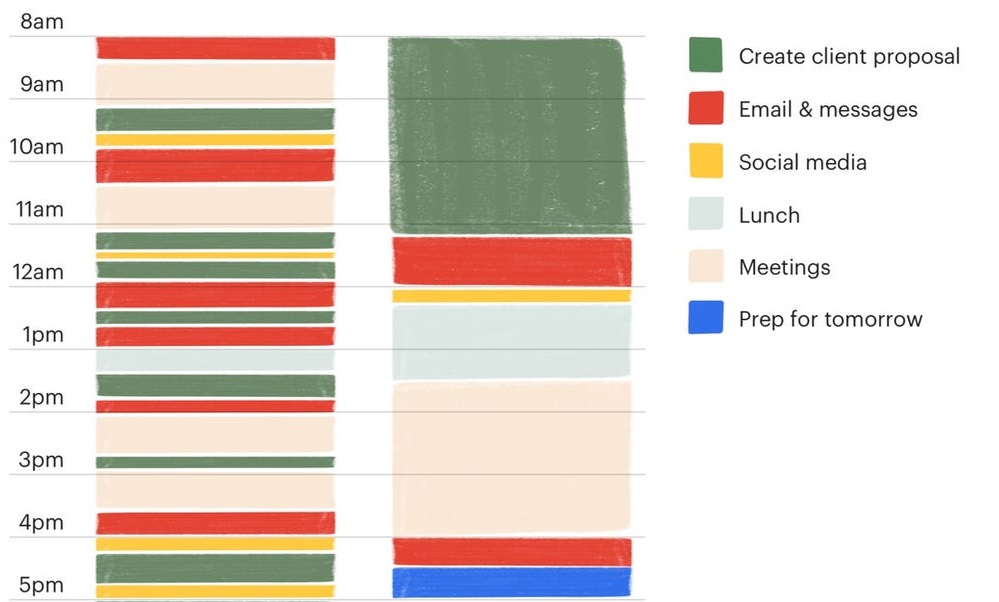
    1. Time Blocking

    What It Is: Time blocking involves scheduling dedicated chunks of time for specific tasks or categories of work. Instead of multitasking, you focus intensely on one task during a set period.

    Pros:

    • Reduces context switching, leading to more focus.
    • Helps prevent burnout by scheduling breaks and work boundaries.
    • Gives a clear overview of how your day will unfold.

    Cons:

    • Requires discipline and sticking to the schedule.
    • Unexpected events may force you to rearrange blocks

    How to Implement: Use a digital calendar or a planner to block out chunks of time for key project activities—e.g., team meetings, deep work sessions, and communication with stakeholders.

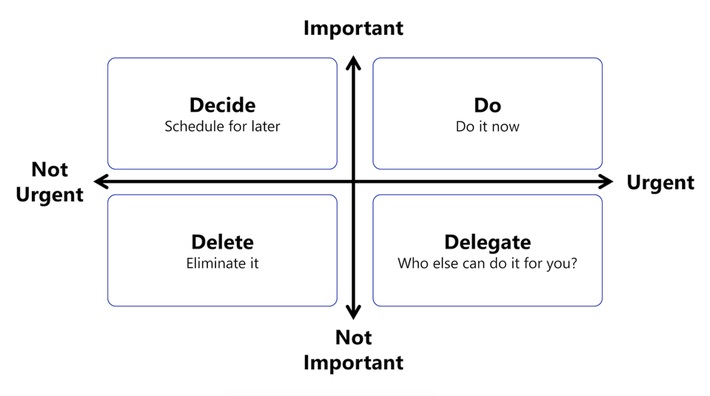
    2. Prioritization (Eisenhower Matrix)

    What It Is: Prioritization frameworks like the Eisenhower Matrix allow you to categorize tasks into four quadrants based on urgency and importance:

    • Urgent and Important (Do first)
    • Important, Not Urgent (Schedule)
    • Urgent, Not Important (Delegate)
    • Not Urgent, Not Important (Eliminate)

    Pros:

    • Ensures you focus on high-impact tasks.
    • Helps you delegate less important tasks.
    • Encourages eliminating unnecessary work.

    Cons:

    • Takes time to categorize tasks correctly.
    • May overlook tasks that could evolve into high-priority issues.

    How to Implement: Review your to-do list daily and categorize each task based on urgency and importance. Focus on high-priority tasks early in the day.

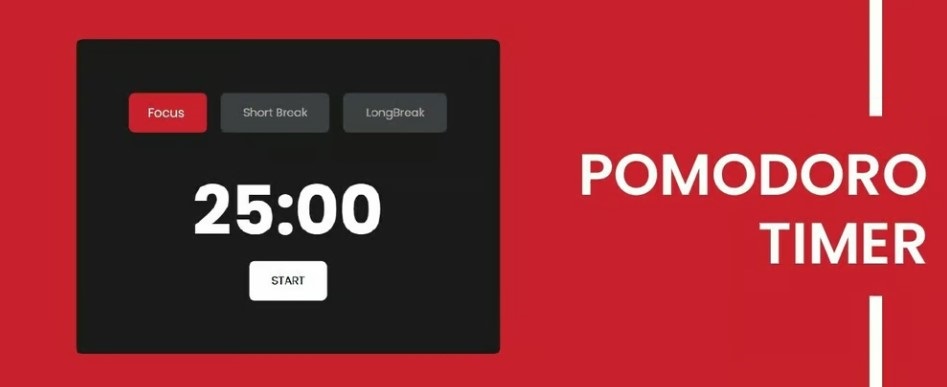
    3. Pomodoro Technique

    What It Is: A time-management method where you work in 25-minute intervals (Pomodoros) with 5-minute breaks in between. After four sessions, take a longer break.

    Pros:

    • Encourages focused work while preventing burnout.
    • Forces regular short breaks to refresh your mind.
    • Can make overwhelming tasks seem more manageable.

    Cons:

    • Not ideal for tasks requiring deep, prolonged concentration.
    • Interruptions can break the flow, making it hard to resume the Pomodoro session.

    How to Implement: Use a timer to break work into Pomodoros. Adjust the work intervals if necessary (e.g., 25 minutes of work followed by a 5-minute break).

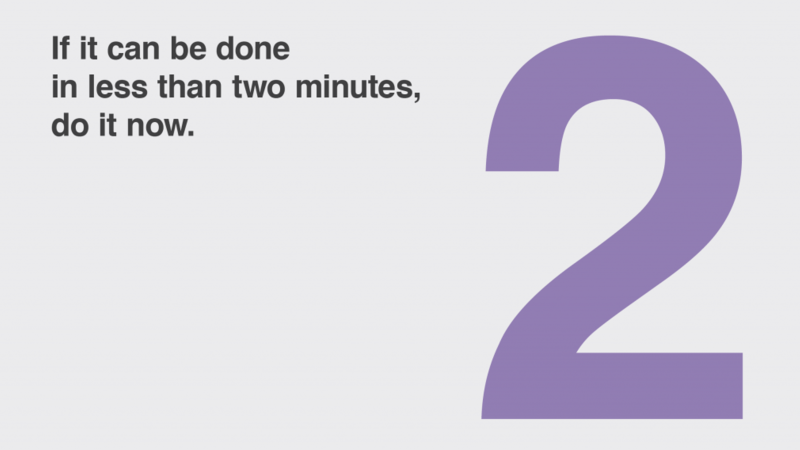
    4. The Two-Minute Rule

    What It Is: If a task takes less than two minutes, do it immediately. This method is part of the Getting Things Done (GTD) system and helps prevent small tasks from accumulating.

    Pros:

    • Quickly clears low-effort tasks off your list.
    • Keeps your task list leaner and more focused.

    Cons:

    • Overusing this method can distract from larger, more important tasks.
    • Not suitable for complex tasks or deep work sessions.

    How to Implement: Regularly review your task list and immediately handle any tasks that take less than two minutes. For larger tasks, schedule time to complete them.

    5. Batching Tasks

    What It Is: Batching involves grouping similar tasks (like replying to emails, updating project statuses, or doing administrative work) into one block of time, reducing task-switching fatigue.

    Pros:

    • Increases efficiency by handling repetitive tasks together.
    • Minimizes distractions from switching between different types of work.

    Cons:

    • Some tasks may not fit neatly into a batch.
    • Requires careful scheduling to avoid task pile-ups.

    How to Implement: Identify recurring tasks that can be batched and schedule them into specific time blocks (e.g., answering emails twice a day instead of checking constantly).

    Pros and Cons of These Methods:

    Pros:

    • Greater productivity and focus by minimizing multitasking.
    • More structured workdays with dedicated time for priority tasks.
    • Less mental fatigue by grouping similar tasks or using time-based intervals like Pomodoros.

    Cons:

    • These methods require discipline and consistency to maintain.
    • Unexpected events can disrupt carefully planned schedules.
    • Some methods, like time blocking or task batching, can feel restrictive if not implemented flexibly.
    Implementation Plan:

    Step 1: Choose Your Core Method
    Start by picking one method that resonates with your work style. For example, if you struggle with multitasking, begin with time blocking. If decision-making is the challenge, start with prioritization using the Eisenhower Matrix.

    Step 2: Set Up Your Tools
    Utilize digital calendars, task management apps, or even simple spreadsheets to organize your time and tasks. Tools like Asana, Trello, or Google Calendar can make time blocking, task batching, and prioritization easier to manage.

    Step 3: Begin Small, Then Scale
    Start by implementing your chosen technique for just one or two days a week. Once you get comfortable, scale it to more days and integrate additional methods like Pomodoros or task batching.

    Step 4: Review and Adjust
    At the end of each week, review your time management strategy. What worked? What didn’t? Adjust your approach to suit your work style, priorities, and project demands.

    Scaling Time Management for Maximum Efficiency

    Mastering time management takes practice, but the rewards are clear. By implementing a mix of strategies like time blocking, prioritization, and batching, you can significantly enhance your productivity while maintaining a healthy work-life balance. Start small, be consistent, and scale your approach as your comfort grows — soon, you’ll find that you’re getting more done in less time, with less stress.

  • Top 10 Project Management Tools to Streamline Your Workflow

    Top 10 Project Management Tools to Streamline Your Workflow

    In today’s fast-paced work environment, effective project management is more important than ever. The right tools not only streamline workflow but also empower teams to be more productive and organized. With countless options available, finding the right tool can be overwhelming. Here’s a rundown of the top 10 project management tools and how they can help you stay on top of your projects.

    1. Trello
    Pros:
    • Visual task management through an intuitive board system.
    • Great for collaboration across small to mid-sized teams.
    • Simple to use with drag-and-drop functionality.
    Cons:
    • Lacks advanced project management features.
    • Limited reporting and tracking capabilities compared to other tools.
    Best Use Case:

    Trello is ideal for teams that need a visual overview of tasks. Using a Kanban system, you can easily track work progress from “To Do” to “Done.” Pairing Trello with automation (via Power-Ups) can eliminate repetitive tasks, making your workflow more efficient.

    2. Asana
    Pros:
    • Customizable workflows and task automation.
    • Timelines, task dependencies, and reporting tools.
    • Easy to manage complex projects and assign tasks.
    Cons:
    • Can be overwhelming for beginners due to its feature richness.
    • Limited offline functionality.
    Best Use Case:

    For teams looking to manage multiple projects simultaneously, Asana’s automation features help streamline repetitive tasks. Use timelines and task dependencies to ensure that everyone is on the same page and that deadlines are met.

    3. Jira
    Pros:
    • Ideal for software development teams working in Agile.
    • Excellent for tracking issues, bugs, and tasks.
    • Comprehensive reporting for sprints, backlogs, and workflows.
    Cons:
    • Not beginner-friendly.
    • Overwhelming for non-technical teams.
    Best Use Case:

    Jira is perfect for teams using Scrum or Kanban methodologies. You can create custom workflows for software development, from sprint planning to issue tracking. Jira’s integration with GitHub or Bitbucket makes it a favorite among developers.

    4. Monday.com
    Pros:
    • Custom workflows and task tracking.
    • Visual and user-friendly interface.
    • Seamless integration with tools like Slack, Google Drive, and more.
    Cons:
    • Can get expensive for large teams.
    • Limited advanced reporting features.
    Best Use Case:

    For teams that want visual project tracking with the flexibility to customize workflows. Monday.com’s integrations and automations allow you to track project progress in real-time and ensure no tasks slip through the cracks.

    5. Smartsheet
    Pros:
    • Combines spreadsheet capabilities with project management.
    • Excellent for managing large datasets and generating detailed reports.
    • Powerful automation features and real-time dashboards.
    Cons:
    • Less intuitive for non-spreadsheet users.
    • Requires some technical knowledge to maximize its potential.
    Best Use Case:

    Trello is ideal for teams that need a visual overview of tasks. Using a Kanban system, you can easily track work progress from “To Do” to “Done.” Pairing Trello with automation (via Power-Ups) can eliminate repetitive tasks, making your workflow more efficient.

    1. Trello
    Pros:
    • Visual task management through an intuitive board system.
    • Great for collaboration across small to mid-sized teams.
    • Simple to use with drag-and-drop functionality.
    Cons:
    • Lacks advanced project management features.
    • Limited reporting and tracking capabilities compared to other tools.
    Best Use Case:

    Smartsheet is a perfect fit for teams that rely heavily on data and spreadsheets. Its automation and reporting features allow you to track progress and generate reports easily, especially for larger, data-driven projects.

    6. ClickUp
    Pros:
    • Customizable with a broad range of features (task management, document collaboration, and goal tracking).
    • Provides time tracking, timelines, and resource management.
    • All-in-one platform that reduces the need for multiple tools.
    Cons:
    • Learning curve due to its feature-heavy interface.
    • Some users may find it cluttered.
    Best Use Case:

    ClickUp works for teams that need a customizable project management tool that combines task management, documentation, and goals into one platform. ClickUp’s flexibility can be tailored to any team’s workflow.

    7. Wrike
    Pros:
    • Real-time project updates, task tracking, and collaboration.
    • Detailed reporting, including resource and budget tracking.
    • Easy team communication with file-sharing and messaging.
    Cons:
    • Limited customization options.
    • May become expensive for large teams.
    Best Use Case:

    Wrike is excellent for teams juggling multiple projects at once. Use its real-time dashboard and task-tracking features to ensure projects stay on track and deadlines are met.

    8. Microsoft Project
    Pros:
    • Powerful for planning and scheduling projects.
    • Advanced resource management and budgeting features.
    • Can handle complex dependencies and timelines.
    Cons:
    • Complex interface that requires training.
    • Expensive, particularly for smaller teams.
    Best Use Case:

    Best for teams working on large, complex projects with many moving parts. Microsoft Project’s advanced planning and scheduling tools ensure that resources are allocated efficiently and deadlines are met.

    9. Notion
    Pros:
    • Flexible platform combining note-taking, databases, and task management.
    • Great for knowledge sharing and collaborative project planning.
    • Clean, minimalistic interface.
    Cons:
    • Can be challenging for teams managing complex projects.
    • Limited task automation.
    Best Use Case:

    Notion is best for creative teams that need a flexible space for brainstorming, note-taking, and organizing project tasks. It’s also excellent for knowledge sharing and documentation.

    10. Basecamp
    Pros:
    • Simple interface with task lists, file sharing, and messaging.
    • Ideal for teams needing basic project tracking and communication.
    • Affordable pricing for small businesses.
    Cons:
    • Lacks advanced project management features.
    • No built-in time tracking or advanced reporting.
    Best Use Case:

    Basecamp is ideal for small to mid-sized teams that need a simple, easy-to-use project management tool. Its communication features (such as message boards) help teams stay connected without over-complicating the workflow.

    Maximizing the Benefit from Any Tool

    Regardless of the tool you choose, here are some systems you can apply across all platforms for maximum benefit:

    1. Automation: Many tools, like Asana, Monday.com, and Smartsheet, offer automation for recurring tasks. Use this to reduce repetitive tasks and save time.
    2. Task Dependencies: Tools like Microsoft Project, ClickUp, and Asana allow you to set task dependencies, ensuring that teams work on the right tasks at the right time.
    3. Dashboards and Reporting: Real-time dashboards in Wrike, Smartsheet, or ClickUp help you monitor project progress in one glance, while reporting tools keep stakeholders updated.
    4. Communication Integration: Integrating your project management tools with communication platforms like Slack (available in Monday.com and Trello) keeps team collaboration smooth.
    A Way Forward: Combining Tools for Maximum Efficiency

    If you’re managing multiple complex projects, you might need more than one tool to meet all your needs. Here are some combinations worth considering:

    • Trello + Slack: For small teams that thrive on collaboration and visual task tracking, combining Trello with Slack creates an efficient, communicative workspace.
    • Jira + Confluence: For software development teams, Jira’s task tracking paired with Confluence’s documentation features offers a comprehensive project management suite.
    • Asana + Google Workspace: For teams that need file sharing and seamless document collaboration, Asana combined with Google Drive ensures smooth integration.
    • ClickUp + Zoom: If you run remote teams, ClickUp’s task management combined with Zoom for communication ensures tasks are on track while keeping teams connected.
    Conclusion

    Choosing the right project management tool can revolutionize how your team operates. Whether you’re a small startup using Trello for task tracking or a large enterprise using Microsoft Project for managing multiple project timelines, understanding the pros and cons of each tool will help you make the best decision. Start with your team’s specific needs, and don’t be afraid to combine tools to create the perfect workflow for your projects.