Tag: productivityhacks

  • The Reitoff Principle: How Doing Nothing Can Boost Productivity and Project Success

    The Reitoff Principle: How Doing Nothing Can Boost Productivity and Project Success

    In a world where hustle culture reigns supreme, the idea of doing nothing sounds almost revolutionary. We’re conditioned to believe that every second of our day needs to be filled with tasks, meetings, and action plans. But what if I told you that sometimes the key to true productivity is stepping back and doing absolutely nothing? Enter the Reitoff Principle—a refreshing philosophy that challenges the status quo by emphasizing the power of rest and recovery.

    By embracing the idea of writing off a day when necessary, you might just unlock greater creativity, better decision-making, and long-term success. But don’t take my word for it—let’s see how this principle played out for two very different project managers, and how you can apply it to your own work.

    A Tale of Two Project Managers

    Meet Alex: A diligent project manager at a bustling tech firm, Alex prides himself on his relentless work ethic. He believes that the key to success is to push through challenges without taking breaks. Whether it’s late nights or weekends, Alex is always “on.” Yet, despite his efforts, his projects often feel disorganized, deadlines slip, and team morale wanes.

    Enter Jamie: Also a project manager but with a different approach. Jamie recognizes the importance of mental well-being and embraces the Reitoff Principle. She allows herself and her team time to step back and recharge, promoting a culture where taking a “write-off” day is seen as an opportunity, not a setback.

    The Contrast in Outcomes

    One summer, both Alex and Jamie were assigned a high-stakes project to develop a new app feature.

    • Alex’s Approach: Determined to stay productive, Alex scheduled back-to-back meetings, micromanaged every detail, and discouraged breaks. The initial momentum fizzled as team members became fatigued and frustrated. Creativity dwindled, and instead of fresh ideas, the team found themselves stuck in a loop of constant rework. The project timeline slipped, resulting in missed deadlines and a lackluster launch.
    • Jamie’s Approach: Conversely, Jamie kicked off the project by setting clear goals but also emphasized the importance of well-being. She encouraged her team to take a day to step back when feeling overwhelmed. After a challenging brainstorming session, Jamie suggested a “write-off” day to recharge. Team members returned invigorated, bursting with fresh ideas. Their creativity flourished, leading to innovative solutions that significantly improved the app’s functionality.
    The Results

    When launch day arrived, Jamie’s team celebrated a successful release, complete with positive user feedback and a well-executed marketing strategy. Alex’s team, on the other hand, faced criticism for their rushed and incomplete features.

    The stark contrast in outcomes illustrates how the Reitoff Principle can lead to enhanced productivity and creativity. By allowing space for rest, Jamie’s team not only met their objectives but exceeded them.

    Implementing the Reitoff Principle: An Actionable Plan

    Inspired by Jamie’s success? Here’s a step-by-step guide to incorporating the Reitoff Principle into your own project management approach:

    1. Recognize the Need for Downtime:
      • Acknowledge the signs of burnout within yourself and your team. Make it clear that rest is essential for long-term productivity.
    2. Schedule “Write-Off” Days:
      • Integrate regular breaks or designated “write-off” days into your project timeline. Encourage your team to use this time to recharge without guilt.
    3. Create a Supportive Culture:
      • Foster an environment where taking a break is normalized. Lead by example—share your own experiences of taking time off to refresh and return with new perspectives.
    4. Encourage Mindfulness Practices:
      • Introduce mindfulness practices, such as meditation or short walks, during work hours to promote mental clarity and focus.
    5. Reflect and Reassess:
      • After completing projects, hold a team meeting to discuss how breaks influenced your outcomes. Gather feedback on the effectiveness of “write-off” days and adjust as needed.
    The Key to Sustainable Success: Doing Less to Achieve More

    The Reitoff Principle serves as a powerful reminder that productivity doesn’t always equate to constant activity. By embracing the idea of taking a step back, you can enhance creativity, boost morale, and ultimately achieve better project outcomes. So, the next time you feel overwhelmed, consider the power of doing nothing—and watch your productivity soar!


  • Unlock Your Potential: 10 Proven Techniques to Boost Daily Productivity

    Unlock Your Potential: 10 Proven Techniques to Boost Daily Productivity

    Meet Jill, a dedicated knowledge worker juggling multiple projects, deadlines, and the endless stream of emails that flood her inbox each day. Despite her hard work, she often feels overwhelmed, struggling to prioritize tasks and manage her time effectively. One morning, after a particularly chaotic week, Jill stumbled upon a productivity workshop that changed her perspective. Inspired, she learned and implemented ten proven techniques to boost her daily productivity, transforming her workflow and reclaiming her time.

    This article explores those techniques, offering actionable strategies to help you enhance your productivity throughout the day.

    Technique 1: Prioritize Your Tasks

    Concept: Understanding the difference between urgent and important tasks is key. The Eisenhower Matrix is a popular tool that helps categorize tasks into four quadrants: urgent and important, important but not urgent, urgent but not important, and neither urgent nor important.

    Applicability: This technique is applicable to both personal and professional tasks.

    Actionable Steps:

    • List all your tasks.
    • Classify them into the four quadrants of the Eisenhower Matrix.
    • Focus on completing tasks in the “urgent and important” quadrant first.
    Technique 2: Time Blocking

    Technique 2: Time Blocking

    Concept: Time blocking involves scheduling specific blocks of time for different tasks, helping you maintain focus and structure throughout the day.

    Applicability: This technique works well for anyone who manages multiple tasks and projects.

    Actionable Steps:

    • Divide your day into blocks of time (e.g., 30-minute or 1-hour segments).
    • Assign specific tasks to each block.
    • Protect these time blocks by avoiding distractions.
    Technique 3: The Pomodoro Technique

    Concept: Developed by Francesco Cirillo, this technique uses a timer to break work into intervals (typically 25 minutes), separated by short breaks.

    Applicability: Ideal for tasks requiring deep concentration.

    Actionable Steps:

    • Set a timer for 25 minutes and work on a task.
    • Take a 5-minute break after the timer goes off.
    • After four cycles, take a longer break (15-30 minutes).
    Technique 4: Set Clear Goals

    Concept: Setting SMART goals helps clarify what you want to achieve and how to measure success.

    Applicability: Useful for both short-term and long-term planning.

    Actionable Steps:

    • Define a specific goal (e.g., “Complete the project proposal by Friday”).
    • Ensure your goal is measurable (e.g., “Write 1000 words”).
    • Set a timeline for completion.
    Technique 5: Minimize Distractions

    Concept: Reducing distractions enhances focus and productivity.

    Applicability: This applies universally in any work environment.

    Actionable Steps:

    • Identify common distractions (e.g., social media, noise).
    • Use apps to block distracting websites during work hours.
    • Create a designated workspace that minimizes interruptions.
    Technique 6: Utilize Productivity Tools

    Concept: Leveraging technology can streamline tasks and enhance organization.

    Applicability: Beneficial for individuals and teams alike.

    Actionable Steps:

    • Explore productivity tools like Todoist for task management, Trello for project tracking, or Notion for documentation.
    • Choose one tool and familiarize yourself with its features.
    • Integrate the tool into your daily workflow.
    Technique 7: Take Regular Breaks

    Concept: Breaks are essential for maintaining mental clarity and preventing burnout.

    Applicability: This applies to anyone looking to maintain high levels of focus.

    Actionable Steps:

    • Schedule breaks into your day (e.g., a 5-minute break every hour).
    • Use break time to stretch, take a walk, or hydrate.
    • Avoid screens during breaks to refresh your mind.
    Technique 8: Optimize Your Workspace

    Concept: A well-organized workspace can improve concentration and productivity.

    Applicability: This technique is beneficial for remote workers and office employees alike.

    Actionable Steps:

    • Declutter your workspace; keep only essential items within reach.
    • Adjust your chair and desk for ergonomic comfort.
    • Personalize your space with motivating elements (e.g., plants, inspiring quotes).
    Technique 9: Review and Reflect

    Concept: Regularly reviewing your work can reveal areas for improvement.

    Applicability: This is useful for ongoing projects and long-term goals.

    Actionable Steps:

    • Set aside time at the end of each day or week to review your accomplishments.
    • Reflect on what went well and what could be improved.
    • Adjust your strategies based on your reflections.
    Technique 10: Maintain a Healthy Work-Life Balance

    Concept: A balanced life enhances overall productivity and well-being.

    Applicability: Crucial for everyone, especially knowledge workers.

    Actionable Steps:

    • Set boundaries for work hours and personal time.
    • Schedule leisure activities and time with loved ones.
    • Practice self-care routines, such as exercise and mindfulness.
    Conclusion

    Jill’s transformation didn’t happen overnight, but by implementing these ten techniques, she learned to manage her time effectively and reduce stress. She now starts her days with a prioritized task list, uses time blocking to stay on track, and takes breaks to recharge. Jill’s story is a testament to the power of these actionable strategies.

    As you explore these techniques, remember that productivity is not just about getting more done; it’s about finding what works for you and creating a sustainable routine. Start with one or two techniques, and as you see progress, gradually incorporate more into your daily life. You, too, can unlock your potential and enhance your productivity!

  • Digital Minimalism: Streamlining Your Online Life for Greater Focus

    Digital Minimalism: Streamlining Your Online Life for Greater Focus

    In our hyper-connected world, the relentless barrage of digital notifications—emails, social media pings, and messaging app alerts—often feels like a never-ending symphony of distractions. These constant interruptions not only fragment our attention but also erode our ability to engage in deep, meaningful work. If you’re finding it harder than ever to focus and stay productive, you’re not alone. But don’t despair—embracing digital minimalism could be your ticket to reclaiming your concentration and enhancing your overall well-being. Let’s dive into how you can streamline your digital life to boost focus, reduce stress, and find more joy in your offline world.

    1. Mastering Mobile Phone Settings to Diminish Distractions
    For iPhone Users
    • Activate Focus Mode: Head to Settings > Focus > Do Not Disturb and set up different Focus modes tailored to your needs—whether you’re working, relaxing, or sleeping. Customize who can reach you during these times and silence those pesky alerts that derail your concentration.
    • Trim Notifications: Go to Settings > Notifications and take control of what’s pinging on your screen. Turn off non-essential notifications and refine what’s truly important.
    • Set App Limits: In Settings > Screen Time, set daily usage limits for apps that tend to consume more time than they should. This can help curb your digital habits and keep distractions at bay.
    For Android Users
    • Employ Do Not Disturb: Navigate to Settings > Sound & vibration > Do Not Disturb and tailor your silence preferences. Choose when and how you want to mute notifications.
    • Manage Notifications: Go to Settings > Apps & notifications > Notifications and fine-tune which apps can interrupt you. This ensures you only receive alerts from the apps that matter most.
    • Set App Timers: Under Settings > Digital Wellbeing & Parental Controls, establish timers for apps. This helps you monitor and manage your screen time, keeping distractions in check.
    2. Decluttering Digital Spaces and Reducing Digital Overload

    Uninstall Unused Apps: Audit your app inventory and say goodbye to those you rarely use. Fewer apps mean fewer distractions and a cleaner, more focused digital environment. Keep only those apps that genuinely add value to your life.

    Curate Social Media Consumption
    • Unfollow Unnecessary Accounts: Clean up your social media feeds by unfollowing accounts that don’t enrich your life or contribute positively. This reduces the noise and helps you stay focused on what really matters.
    • Set Usage Limits: Use built-in tools on social media platforms to monitor and limit your time spent scrolling. This will help you stay mindful of your digital consumption and avoid mindless browsing.
    Reduce News Overload

    Limit Your Sources: Choose a few reliable news sources to follow. This prevents information overload and helps you stay informed without being overwhelmed by endless news updates.

    Streamline Chat and Contact Lists
    • Exit Inactive Groups: Review your chat groups and exit those that no longer serve a purpose. It’s perfectly fine to leave groups that no longer align with your interests or needs.
    • Organize Contacts: Regularly clean up your contact list. Remove or archive contacts you no longer interact with to simplify your communication channels.
    3. Additional Tips for a More Focused and Joyful Digital Life
    Leverage Digital Tools Wisely
    • Opt for Single-Purpose Apps: Choose apps that excel at one function rather than multi-purpose apps that can become cluttered. This helps streamline your digital activities and minimizes distractions.
    • Use Task Management Tools: Employ tools like Todoist, Asana, or Trello to organize your tasks but avoid overloading them. Focus on high-priority items to maintain clarity and efficiency.
    Enhance Email and Communication Hygiene
    • Schedule Email Checks: Instead of constant email checking, set specific times to manage your inbox. This reduces interruptions and improves focus on other tasks.
    • Utilize Email Filters: Set up filters to organize incoming emails into categories. This helps prioritize your responses and manage your inbox more effectively.
    Optimize Your Digital Workspace
    • Declutter Your Desktop: Keep your digital workspace organized. A tidy desktop and well-organized file directories can reduce stress and improve focus.
    • Embrace Minimalist Design: Customize your digital environment with a minimalist design. Use simple wallpapers and limit widgets or shortcuts to reduce visual clutter.
    Reevaluate Digital Subscriptions
    • Review and Cancel: Regularly assess your digital subscriptions and cancel those that no longer serve you. Focus on high-quality sources that provide real value.
    • Limit to Quality Sources: Choose a few valuable subscriptions that enhance your personal or professional life. This helps avoid unnecessary content consumption.
    Establish Tech-Free Zones and Times
    • Create Tech-Free Zones: Designate areas in your home where technology is not allowed, like the dining room or bedroom. This fosters more meaningful interactions and restful environments.
    • Schedule Offline Activities: Plan regular tech-free periods for hobbies and family time. Engage in activities that don’t involve screens to refresh and rejuvenate your mind.
    Stay Informed and Seek Guidance
    • Educate Yourself: Keep up with research and best practices on digital well-being. This knowledge will guide you in making informed decisions about your technology use.
    • Seek Professional Advice: If managing digital distractions proves challenging, consider consulting a mental health professional or productivity coach specializing in digital well-being.

    By incorporating these strategies, you can transform your digital landscape into a space that supports your productivity and well-being. Digital minimalism isn’t just about reducing distractions—it’s about creating a digital environment that enhances your focus, reduces stress, and ultimately leads to a happier and more fulfilling life. Embrace the principles of digital minimalism and watch as your life and work become more streamlined and enjoyable.

  • Mastering Time Management: Proven Strategies for Project Managers to Get More Done in Less Time

    Mastering Time Management: Proven Strategies for Project Managers to Get More Done in Less Time

    Time management is one of the most critical skills for a project manager, where juggling multiple tasks, deadlines, and team responsibilities is the norm. This guide will explore key methods like time blocking, prioritization, and other actionable techniques that can help you streamline your workday and boost productivity without adding hours to your schedule.

    Key Concepts for Getting More Done with Less Time
    1. Time Blocking

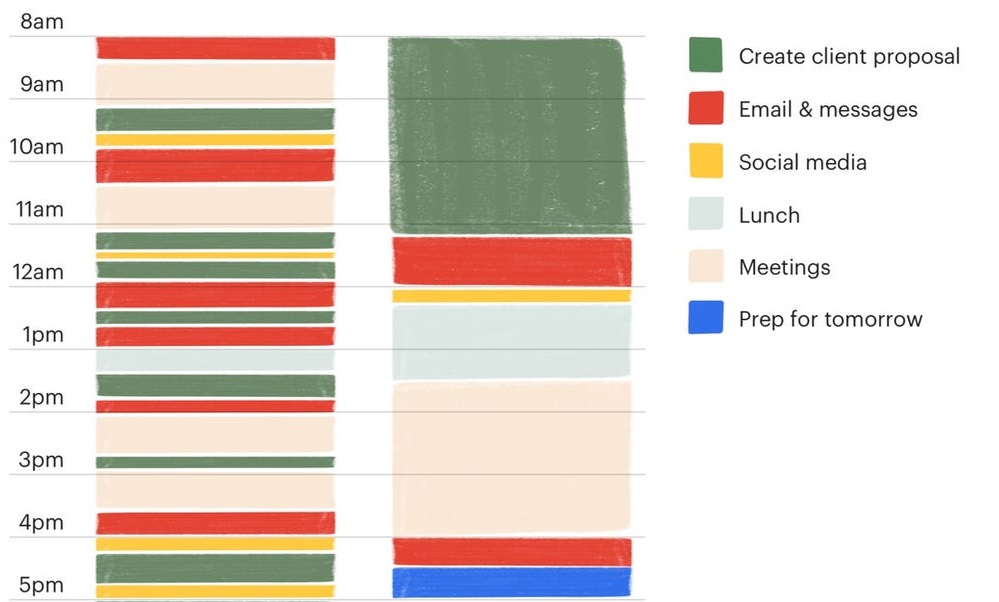
    What It Is: Time blocking involves scheduling dedicated chunks of time for specific tasks or categories of work. Instead of multitasking, you focus intensely on one task during a set period.

    Pros:

    • Reduces context switching, leading to more focus.
    • Helps prevent burnout by scheduling breaks and work boundaries.
    • Gives a clear overview of how your day will unfold.

    Cons:

    • Requires discipline and sticking to the schedule.
    • Unexpected events may force you to rearrange blocks

    How to Implement: Use a digital calendar or a planner to block out chunks of time for key project activities—e.g., team meetings, deep work sessions, and communication with stakeholders.

    2. Prioritization (Eisenhower Matrix)

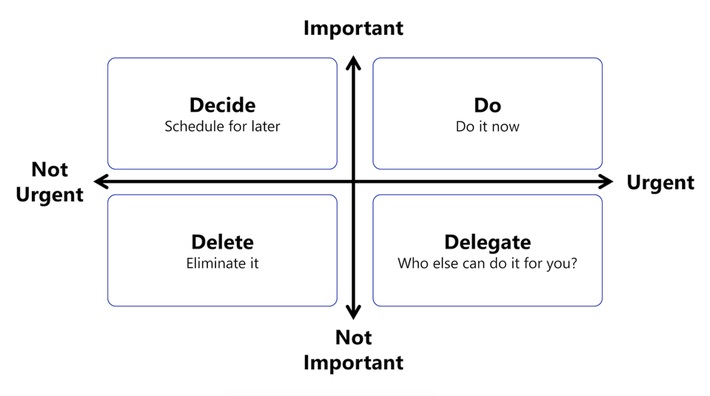
    What It Is: Prioritization frameworks like the Eisenhower Matrix allow you to categorize tasks into four quadrants based on urgency and importance:

    • Urgent and Important (Do first)
    • Important, Not Urgent (Schedule)
    • Urgent, Not Important (Delegate)
    • Not Urgent, Not Important (Eliminate)

    Pros:

    • Ensures you focus on high-impact tasks.
    • Helps you delegate less important tasks.
    • Encourages eliminating unnecessary work.

    Cons:

    • Takes time to categorize tasks correctly.
    • May overlook tasks that could evolve into high-priority issues.

    How to Implement: Review your to-do list daily and categorize each task based on urgency and importance. Focus on high-priority tasks early in the day.

    3. Pomodoro Technique

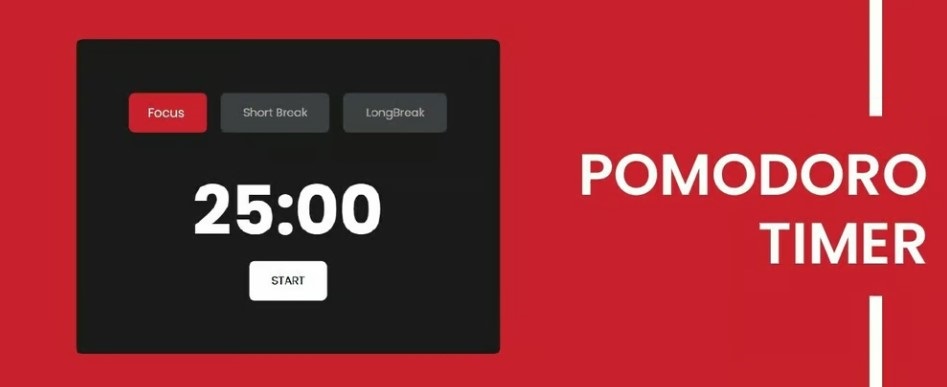
    What It Is: A time-management method where you work in 25-minute intervals (Pomodoros) with 5-minute breaks in between. After four sessions, take a longer break.

    Pros:

    • Encourages focused work while preventing burnout.
    • Forces regular short breaks to refresh your mind.
    • Can make overwhelming tasks seem more manageable.

    Cons:

    • Not ideal for tasks requiring deep, prolonged concentration.
    • Interruptions can break the flow, making it hard to resume the Pomodoro session.

    How to Implement: Use a timer to break work into Pomodoros. Adjust the work intervals if necessary (e.g., 25 minutes of work followed by a 5-minute break).

    4. The Two-Minute Rule

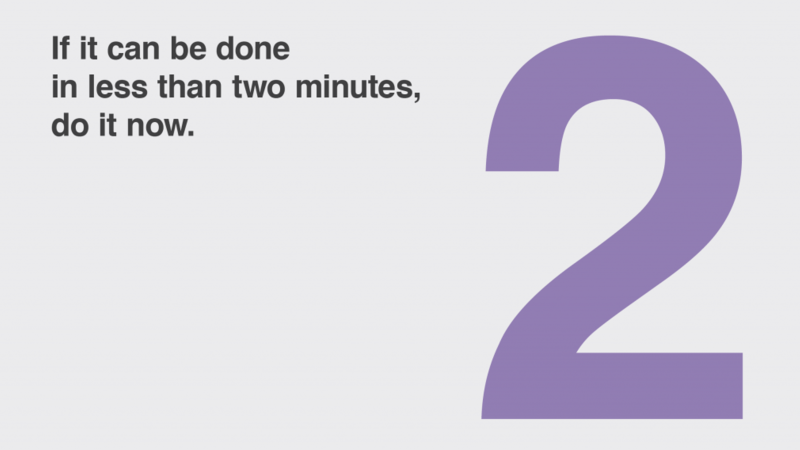
    What It Is: If a task takes less than two minutes, do it immediately. This method is part of the Getting Things Done (GTD) system and helps prevent small tasks from accumulating.

    Pros:

    • Quickly clears low-effort tasks off your list.
    • Keeps your task list leaner and more focused.

    Cons:

    • Overusing this method can distract from larger, more important tasks.
    • Not suitable for complex tasks or deep work sessions.

    How to Implement: Regularly review your task list and immediately handle any tasks that take less than two minutes. For larger tasks, schedule time to complete them.

    5. Batching Tasks

    What It Is: Batching involves grouping similar tasks (like replying to emails, updating project statuses, or doing administrative work) into one block of time, reducing task-switching fatigue.

    Pros:

    • Increases efficiency by handling repetitive tasks together.
    • Minimizes distractions from switching between different types of work.

    Cons:

    • Some tasks may not fit neatly into a batch.
    • Requires careful scheduling to avoid task pile-ups.

    How to Implement: Identify recurring tasks that can be batched and schedule them into specific time blocks (e.g., answering emails twice a day instead of checking constantly).

    Pros and Cons of These Methods:

    Pros:

    • Greater productivity and focus by minimizing multitasking.
    • More structured workdays with dedicated time for priority tasks.
    • Less mental fatigue by grouping similar tasks or using time-based intervals like Pomodoros.

    Cons:

    • These methods require discipline and consistency to maintain.
    • Unexpected events can disrupt carefully planned schedules.
    • Some methods, like time blocking or task batching, can feel restrictive if not implemented flexibly.
    Implementation Plan:

    Step 1: Choose Your Core Method
    Start by picking one method that resonates with your work style. For example, if you struggle with multitasking, begin with time blocking. If decision-making is the challenge, start with prioritization using the Eisenhower Matrix.

    Step 2: Set Up Your Tools
    Utilize digital calendars, task management apps, or even simple spreadsheets to organize your time and tasks. Tools like Asana, Trello, or Google Calendar can make time blocking, task batching, and prioritization easier to manage.

    Step 3: Begin Small, Then Scale
    Start by implementing your chosen technique for just one or two days a week. Once you get comfortable, scale it to more days and integrate additional methods like Pomodoros or task batching.

    Step 4: Review and Adjust
    At the end of each week, review your time management strategy. What worked? What didn’t? Adjust your approach to suit your work style, priorities, and project demands.

    Scaling Time Management for Maximum Efficiency

    Mastering time management takes practice, but the rewards are clear. By implementing a mix of strategies like time blocking, prioritization, and batching, you can significantly enhance your productivity while maintaining a healthy work-life balance. Start small, be consistent, and scale your approach as your comfort grows — soon, you’ll find that you’re getting more done in less time, with less stress.

  • How AI Might Be Revolutionizing Project Management

    How AI Might Be Revolutionizing Project Management

    We’re living in an age where the buzzwords of yesterday are quickly becoming the business tools of today. Artificial Intelligence (AI) is no longer the realm of sci-fi; it’s rapidly embedding itself into the fabric of how we work, particularly in project management. For project managers, staying ahead of deadlines, managing resources, and navigating unexpected curveballs are all part of the job. But what if AI could turn these challenges into opportunities, offering smarter ways to predict risks, optimize schedules, and enhance decision-making?

    The Rise of AI-Powered Tools in Project Management

    Imagine starting your day, not with an overwhelming task list, but with a smart assistant that has already analyzed your team’s workload, anticipated bottlenecks, and provided optimized solutions. Sounds like magic, right? Well, welcome to the age of AI in project management.

    AI-powered tools are transforming the way projects are planned and executed by automating tedious processes and offering insights that would take a human brain hours, if not days, to generate.

    1. Predicting Risks Before They Become Problems

    One of the most powerful capabilities of AI in project management is risk prediction. Through machine learning algorithms, AI can scan historical data from previous projects, identify patterns, and predict potential risks before they happen. Whether it’s budget overruns, team burnout, or supplier delays, AI tools can flag issues early on and even suggest mitigation strategies. This enables project managers to not only react faster but, in many cases, avoid crises altogether.

    In essence, AI helps project managers move from firefighting mode to a proactive stance, ensuring smoother operations and happier teams.

    2. Optimizing Schedules Like Never Before

    Who hasn’t had the headache of adjusting timelines when a project starts veering off course? Traditional scheduling tools are static and often feel like they’re working against you when changes occur. Enter AI scheduling optimizers—these dynamic tools don’t just plan a project based on input; they continuously learn and adapt.

    AI-powered schedulers factor in every imaginable variable—resource availability, task dependencies, weather conditions (in some cases), and even team member efficiency. These tools dynamically adjust schedules in real time, providing the project manager with the most efficient path forward. You’ll spend less time adjusting timelines and more time focusing on high-impact decisions.

    3. Enhanced Decision-Making With Data-Driven Insights

    AI doesn’t just help automate tasks; it supercharges decision-making by offering data-backed insights that help project managers make smarter choices. Have you ever been stuck choosing between two suppliers or debating which team member is best suited for a task? AI can assess numerous factors—from past performance to project-specific needs—and recommend the best course of action.

    By processing massive amounts of data that no human could possibly analyze on their own, AI helps cut through the noise and provides actionable, informed advice. Think of it as having a project mentor that’s always available, always learning, and always improving.

    The Human Touch: AI as Your Co-Pilot, Not Your Replacement

    Before we start imagining a future where robots run our projects, let’s clear one thing up — AI is not here to replace project managers. Far from it. In fact, AI’s greatest strength lies in enhancing the human element. By automating mundane tasks, predicting problems, and providing data-driven insights, AI frees up project managers to focus on what truly matters: leading, inspiring, and making judgment calls that only a human can make.

    At its core, AI is a co-pilot, guiding you through complex project landscapes, allowing you to work smarter, not harder.

    Practical AI Tools for Project Managers Today

    So, how can you harness this revolution today? Thankfully, you don’t need to be a tech guru to integrate AI into your daily workflow. Here’s a checklist to get started:

    AI Checklist for Project Managers:
    1. Risk Prediction Tools: Start using platforms like Oracle Primavera or RiskLens that leverage AI to predict project risks and suggest mitigation strategies.
    2. AI-Driven Scheduling: Explore tools like Monday.com or ClickUp with AI scheduling assistants that adapt your timelines based on real-time project updates.
    3. Resource Management: Implement tools like Toggl Plan or Resource Guru, which use AI to optimize resource allocation and ensure teams aren’t overburdened.
    4. Automated Reporting: Tools like Wrike or Zoho Projects can generate AI-based reports that highlight key insights and trends, helping you make faster decisions.
    5. Chatbots for Collaboration: Integrate AI chatbots (like Trello Bots or Slack’s Workbot) to manage tasks, set reminders, and facilitate smoother communication within your team.
    6. AI-Enhanced Decision Support: Consider tools like GiniMachine for data-backed decision-making, providing recommendations based on previous project data.
    7. AI-Driven Analytics: Use AI-based analytics platforms like Smartsheet or Microsoft Project to visualize project performance and make data-driven adjustments.
    In Conclusion

    AI is no longer just a futuristic concept — it’s here, and it’s changing the way projects are managed. By embracing AI-powered tools, project managers can predict risks before they happen, optimize their schedules, and make better, faster decisions. Best of all, AI helps you focus on what really matters: leading your team to success.

    The future of project management is bright — and it’s AI-powered.