Tag: time-management

  • Mastering Your Email: The Ultimate Guide to Inbox Zero

    Mastering Your Email: The Ultimate Guide to Inbox Zero

    n today’s fast-paced digital world, our email inboxes can quickly become overwhelming, distracting us from our most important tasks and contributing to stress and decreased productivity. Enter the concept of “Inbox Zero,” a powerful method for managing your emails effectively. Let’s explore what Inbox Zero is, where it originated, and how you can implement it to enhance your productivity and reduce stress.

    What is Inbox Zero?

    Inbox Zero is a rigorous approach to managing your email inbox, aimed at keeping it empty—or nearly empty—at all times. The term was coined by productivity expert Merlin Mann, who introduced it as a way to help people reclaim their time and attention from the constant influx of emails.

    The Origin and Inventor of Inbox Zero

    Merlin Mann, a writer, speaker, and productivity guru, developed the Inbox Zero method. Mann is well-known for his work on productivity and time management, particularly through his website 43 Folders. His insights into how digital tools can either enhance or hinder our productivity have made him a respected figure in the world of personal and professional efficiency.

    Born in Cincinnati, Ohio, Mann initially worked in web development and design before focusing on writing and public speaking. His passion for productivity and helping others led him to create Inbox Zero, which has since become a widely adopted strategy in both personal and professional settings.

    Core Principles of Inbox Zero

    The Inbox Zero approach is built on several core principles designed to help you process emails quickly and efficiently:

    1. Process, Don’t Procrastinate:

    Address emails as you read them rather than letting them accumulate. For instance, when you receive an email asking for a report, decide immediately whether you can do it now, delegate it, or schedule it for later. If you can handle the request in a few minutes, do it right away to keep your inbox clear.

    2. Delete or Archive:

    Immediately get rid of emails that you don’t need. If you receive a newsletter you don’t read, delete it right away or archive it if you might need it for reference. For example, after skimming a newsletter from a professional association, archive it for future reference if it contains valuable information or delete it if it doesn’t.

    3. Delegate:

    Forward emails to the appropriate person if they are better suited to handle them. For example, if an email comes in about a task another team member can handle, delegate it to them and move on. An email requesting technical support should be forwarded to your IT department rather than handling it yourself if it’s not your area of expertise.

    4. Respond:

    Reply to emails that require a response as soon as possible. If a client requests a meeting, respond immediately to confirm or propose a time. For example, if an email asks for your availability next week, reply immediately with your available time slots.

    5. Defer:

    Move emails that require more time or effort to a separate folder or task list. For instance, if an email requires extensive research, move it to a “To Do” folder and schedule time to address it later. Use a task management tool to set a reminder to ensure it gets done.

    6. Do:

    If an email can be dealt with in less than two minutes, handle it immediately. This could be confirming an appointment, sending a quick piece of information, or acknowledging receipt of a document. For example, if a colleague asks for a document that you can easily attach and send, do it right away.

    Steps to Achieve Inbox Zero

    Achieving Inbox Zero involves adopting specific concepts and processes. Here are guidelines to help you get there:

    1. Set Specific Times for Checking Email:

    Avoid constantly checking your inbox. Designate specific times during the day to process emails. For example, check your email first thing in the morning, after lunch, and at the end of the day. This helps you focus on your core tasks without frequent interruptions.

    2. Use Filters and Labels:

    Automate email organization by setting up filters and labels in your email client. For instance, create filters to automatically sort newsletters, promotional emails, and work-related emails into different folders. In Gmail, you can set up filters to label and archive newsletters so they don’t clutter your primary inbox.

    3. Unsubscribe Ruthlessly:

    Regularly unsubscribe from newsletters and promotional emails you no longer find useful. This reduces the volume of emails and helps keep your inbox manageable. Use tools like Unroll.Me to quickly unsubscribe from multiple email lists.

    4. Use the Two-Minute Rule:

    If an email requires an action that takes less than two minutes, do it immediately. This prevents small tasks from piling up and overwhelming you. For example, replying with a quick confirmation or forwarding an email to the correct person should be done on the spot.

    5. Create Action Folders:

    Use folders such as “Action,” “Waiting,” and “Reference” to organize emails that need follow-up. This keeps your inbox clear and helps you track what needs to be done. For example, move an email about an upcoming project to an “Action” folder to address later when you have more time.

    6. Archive Regularly:

    Move emails out of your inbox and into archive folders once they have been processed. For example, after replying to a client’s query, archive the email to keep your inbox tidy. This also makes it easy to find the email later if needed.

    Implementing Inbox Zero in Gmail and Outlook
    Gmail:
    1. Use Labels and Filters:

    Create labels and filters to automatically sort incoming emails. For example, set up a filter to label all emails from your boss as “High Priority.”

    2. Priority Inbox:

    Enable Priority Inbox to automatically categorize emails by importance, helping you focus on the most critical messages first.

    3. Snooze Feature:

    Use the snooze feature to defer emails and have them return to your inbox at a more convenient time, ensuring you deal with them when you’re ready.

    4. Keyboard Shortcuts:

    Enable and use keyboard shortcuts to speed up email processing. For example, use “e” to archive an email quickly.

    Outlook:
    1. Rules and Categories:

    Set up rules to automatically sort and categorize emails. For example, create a rule to move all emails with “Meeting” in the subject line to a specific folder.

    2. Focused Inbox:

    Use the Focused Inbox feature to separate important emails from the rest, ensuring you see high-priority messages first.

    3. Quick Steps:

    Utilize Quick Steps to automate repetitive actions, such as archiving or forwarding emails. For instance, create a Quick Step to move emails to your “To Do” folder with one click.

    4. Flags and Tasks:

    Use flags and the Tasks feature to track emails that require follow-up, ensuring nothing slips through the cracks. For example, flag an email that needs a response later and it will automatically appear in your Tasks list.

    Integrating Flags and Tasks with Microsoft To-Do

    In Outlook, flagged emails automatically sync with Microsoft To-Do, creating a seamless integration between your email and task management. When you flag an email in Outlook, it appears in your To-Do list, allowing you to track and manage tasks without missing any important follow-ups. This integration helps streamline your workflow by consolidating your tasks in one place, making it easier to prioritize and complete them.

    How Inbox Zero Enhances Productivity and Reduces Stress

    An empty inbox is more than just an aesthetic victory; it’s a gateway to enhanced productivity and reduced stress. Here’s how:

    1. Reduced Cognitive Load:

    A cluttered inbox is a constant reminder of unfinished tasks and unanswered emails. This background noise can sap your mental energy and make it harder to focus on the task at hand. By clearing your inbox, you reduce this cognitive load, freeing up mental space to concentrate on more important activities.

    Imagine you have 200 unread emails. Each time you open your inbox, you’re overwhelmed by the sheer number. By processing, deleting, and archiving, you clear out the clutter, leaving only a few actionable items. This makes it easier to focus on what’s truly important.

    2. Improved Focus:

    With fewer distractions from incoming emails, you can focus on deep work that requires concentration. An empty inbox helps create a distraction-free environment where you can dedicate your attention to tasks that matter most.

    Instead of being interrupted by email notifications, you schedule email processing times and focus solely on your projects during other times, leading to more productive work sessions.

    3. Clear Prioritization:

    Inbox Zero forces you to make quick decisions about what needs your attention now, what can wait, and what can be delegated or deleted. This helps in setting clear priorities and ensures that important tasks are addressed promptly.

    When you receive an email about an urgent issue, you address it immediately. Less urgent emails are deferred or delegated, ensuring that high-priority tasks get the attention they need without delay.

    4. Less Stress:

    A full inbox can be a source of stress and anxiety. The constant stream of new messages and the fear of missing something important can be overwhelming. Maintaining Inbox Zero means you have a clear handle on your communications, reducing stress and giving you a sense of control.

    Knowing your inbox is under control and that nothing important will be missed helps reduce the anxiety associated with email overload, leading to a more relaxed and focused work environment.

    5. Increased Efficiency:

    By processing emails as they come in, you avoid the buildup of a backlog. This means that you can handle tasks more efficiently, preventing small tasks from turning into bigger problems due to neglect.

    Quickly replying to a simple request avoids a situation where multiple follow-up emails are needed, saving time for both you and the requester.

    Why Inbox Zero is Key for Project Managers

    For project managers, staying on top of emails is crucial. An overflowing inbox can lead to missed deadlines, overlooked tasks, and poor communication. Inbox Zero ensures that project managers can quickly process and prioritize emails, allowing them to maintain clear and efficient communication with their team and stakeholders. This level of organization is essential for keeping projects on track and ensuring that all team members are aligned and informed. A project manager who practices Inbox Zero can manage project updates, stakeholder communications, and task delegations seamlessly, ensuring smooth project execution and timely completion.

    Conclusion

    Adopting the Inbox Zero approach can transform the way you handle emails, leading to increased productivity, reduced stress, and greater success in both personal and professional endeavors. By following the core principles and implementing the guidelines outlined above, you can take control of your inbox and reclaim your time and attention. Whether you’re using Gmail or Outlook, these strategies will help you maintain a clean and organized inbox, setting you up for success. By staying on top of your emails, especially as a project manager, you ensure that important communications are handled promptly, and projects run smoothly, ultimately driving better results and enhancing your overall efficiency. Embrace Inbox Zero and experience the profound impact it can have on your daily productivity and peace of mind.

  • Boost Your Productivity and Reduce Stress: The Magic of the Eisenhower Matrix

    Boost Your Productivity and Reduce Stress: The Magic of the Eisenhower Matrix

    In the world of productivity hacks and time management tools, the Eisenhower Matrix stands out as a timeless and powerful method for making better decisions faster. Whether you’re a busy professional juggling multiple projects or a team leader aiming to optimize your team’s efficiency, this simple yet effective tool can transform the way you work. But where did it come from, and how can you apply it to your daily tasks? Let’s dive into the origins, usage, and benefits of the Eisenhower Matrix.

    The Origins of the Eisenhower Matrix

    The Eisenhower Matrix, also known as the Urgent-Important Matrix, is named after Dwight D. Eisenhower, the 34th President of the United States. Eisenhower, who was known for his incredible productivity, is often quoted as saying, “What is important is seldom urgent, and what is urgent is seldom important.” This philosophy guided him through a career that included being a five-star general in the U.S. Army during World War II and serving two terms as President.

    The matrix itself was popularized by Stephen Covey in his book “The 7 Habits of Highly Effective People,” where he introduced it as a key tool for time management.

    How the Eisenhower Matrix Works

    The Eisenhower Matrix helps you categorize tasks into four distinct quadrants based on their urgency and importance:

    1. Quadrant 1: Urgent and Important (Do First)
      • These tasks require immediate attention and have significant consequences if not completed. Examples include:
        • Handling a project deadline
        • Addressing a critical issue in a project
        • Resolving urgent customer complaints
    2. Quadrant 2: Important but Not Urgent (Schedule)
      • Tasks that are important for long-term success but do not need immediate action. Examples include:
        • Strategic planning for an upcoming project
        • Personal development activities like training
        • Building relationships with key stakeholders
    3. Quadrant 3: Urgent but Not Important (Delegate)
      • Tasks that require immediate attention but can be delegated to others. Examples include:
        • Routine administrative tasks
        • Scheduling meetings
        • Answering some emails
    4. Quadrant 4: Neither Urgent nor Important (Eliminate)
      • Tasks that do not contribute to your goals and can be eliminated or minimized. Examples include:
        • Excessive social media browsing
        • Attending non-essential meetings
        • Engaging in trivial activities
    Applying the Eisenhower Matrix: A Practical Example

    Imagine you’re managing a project to launch a new product. Here’s how you might use the Eisenhower Matrix:

    • Quadrant 1: Finalizing the product design (urgent and important), fixing a critical bug found in testing (urgent and important).
    • Quadrant 2: Developing a marketing strategy (important but not urgent), conducting team training sessions (important but not urgent).
    • Quadrant 3: Organizing team-building activities (urgent but not important), handling routine customer service queries (urgent but not important).
    • Quadrant 4: Attending a meeting about a different, unrelated project (neither urgent nor important), checking social media during work hours (neither urgent nor important).
    Speeding Up Decision Making with the Eisenhower Matrix

    Using the Eisenhower Matrix accelerates decision making by providing a clear framework for prioritization. Here’s how:

    • Clarity and Focus: The matrix helps you quickly identify what tasks need your immediate attention and which can be scheduled, delegated, or eliminated. This clarity reduces the time spent deliberating on what to tackle next.
    • Reduced Procrastination: By breaking down tasks into these categories, you can tackle high-priority tasks head-on, reducing the tendency to procrastinate.
    • Efficient Delegation: Recognizing tasks that can be delegated frees up your time to focus on more critical activities, enhancing overall productivity.
    Positive Effects on Knowledge Workers and Project Teams

    For knowledge workers and project teams, the benefits of using the Eisenhower Matrix are substantial:

    • Enhanced Productivity: Focusing on important tasks that add real value leads to better outcomes and faster project completion.
    • Improved Time Management: Efficiently allocating time based on task priority ensures that deadlines are met without last-minute rushes.
    • Reduced Stress: With a clear plan of action, the overwhelming feeling of having too much to do diminishes, leading to a more manageable workload.
    • Better Collaboration: Teams can align on what tasks are most critical, ensuring everyone is working towards the same goals with clear priorities.
    Conclusion

    The Eisenhower Matrix is more than just a time management tool; it’s a strategy for transforming how you approach your work. By categorizing tasks based on urgency and importance, you can make better decisions, work more efficiently, and reduce stress. Whether you’re an individual looking to boost your productivity or a team leader striving to optimize your team’s performance, the Eisenhower Matrix is a game-changer.

    So, why wait? Start using the Eisenhower Matrix today and watch your productivity soar while stress takes a back seat.

  • Unlock Supreme Productivity: The Revolutionary Power of Timeboxing!

    Unlock Supreme Productivity: The Revolutionary Power of Timeboxing!

    In the fast-paced world we live in, finding an effective time management strategy can be the key to unlocking peak productivity. One such game-changing technique is timeboxing—a method that promises to eliminate the chaos of to-do lists, supercharge your efficiency, and reduce stress. But where did this technique come from, and how can it transform your daily life and projects? Let’s dive in!

    The Origins of Timeboxing: A Blast from the Past

    Timeboxing, though popularized in recent years, has roots that stretch back to the early days of computing. It was first conceptualized by James Martin in the 1980s. Martin, a British computer scientist, introduced timeboxing in his book “Rapid Application Development” as a way to manage project timelines effectively. The technique was initially designed to keep software projects on track by allocating fixed time periods for specific tasks, ensuring that work progressed steadily without succumbing to endless perfectionism.

    What Exactly is Timeboxing?

    At its core, timeboxing is a simple yet powerful concept: it involves allocating a fixed unit of time to a task and then completing the task within that time frame. Once the time is up, you stop working on that task, regardless of whether it’s finished. This creates a sense of urgency and focuses your efforts, helping you to avoid the pitfalls of over-analysis and procrastination.

    Implementing Timeboxing: A Practical Example

    Imagine you have a report to write that you estimate will take about two hours. Instead of writing “Finish report” on your to-do list, you schedule two one-hour timeboxes. During each timebox, you work exclusively on the report without distractions. If the report isn’t finished within these two hours, you can decide whether to allocate another timebox or move on to another task. This method not only keeps you on track but also provides a clear structure to your day.

    From To-Do Lists to Timeboxing: A Productivity Revolution

    Traditional to-do lists can often become overwhelming and stressful, especially when they grow long and unmanageable. Timeboxing transforms your approach by turning tasks into scheduled commitments. Instead of a daunting list of tasks, you have a structured schedule where every task has its place. This shift reduces the cognitive load of decision-making throughout the day and helps you maintain a steady workflow.

    The Magic of Timeboxing for Project Managers

    For project managers, integrating timeboxing into daily work and projects can be a game-changer. By assigning fixed time periods to specific project tasks, project managers can ensure that progress is made consistently. This approach helps in identifying potential bottlenecks early and adjusting plans proactively. It also fosters a sense of accomplishment as teams complete tasks within set time frames, boosting morale and productivity.

    Moreover, timeboxing can streamline meetings, a common time drain in projects. By allocating specific time slots for each agenda item, meetings become more focused and efficient, leading to better decision-making and time savings.

    Timeboxing with Digital Calendars

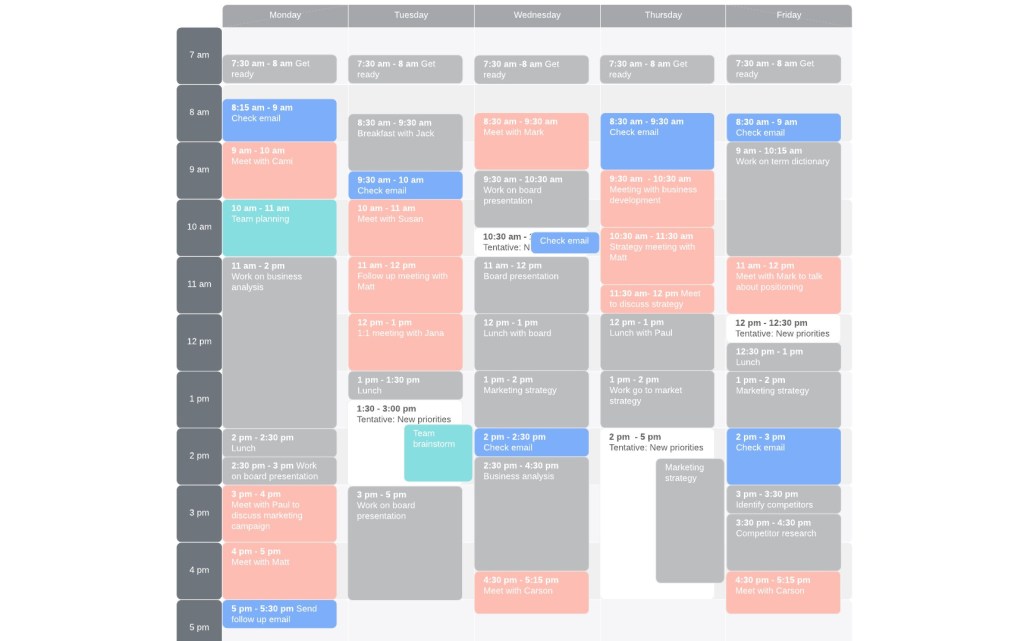
    Incorporating timeboxing into digital calendars like Outlook, iCal, or Google Calendar can make the process even more effective. To start, create calendar events for each task you need to accomplish, setting specific start and end times. This visual representation helps you see your entire day or week at a glance, making it easier to manage your time and ensure that no task is overlooked. For instance, if you have a busy week filled with meetings, you can block out dedicated timeboxes for deep work early in the morning or late in the afternoon when interruptions are less likely. This ensures that important, focus-intensive tasks get the attention they need without being constantly disrupted by meetings.

    Synergizing Timeboxing with GTD and the Pomodoro Technique

    Integrating timeboxing with the Getting Things Done (GTD) methodology and the Pomodoro Technique can further enhance productivity. GTD involves capturing tasks, clarifying what they entail, organizing them, reflecting on them regularly, and engaging in them appropriately. Timeboxing fits seamlessly into this framework by providing the “engage” component a structured time frame.

    The Pomodoro Technique, which involves working in 25-minute intervals followed by short breaks, is a natural fit with timeboxing. By dividing your timeboxes into Pomodoro intervals, you can maintain high levels of concentration and avoid burnout.

    Prioritizing Tasks with Timeboxing: The Pareto Principle

    When prioritizing tasks for timeboxing, the Pareto Principle—also known as the 80/20 rule—can be incredibly useful. This principle suggests that 80% of results come from 20% of efforts. Identify the tasks that will have the most significant impact and allocate timeboxes to these high-priority activities first. This ensures that you’re focusing on what truly matters and getting the most value from your efforts.

    Conclusion

    Timeboxing is more than just a productivity hack; it’s a paradigm shift in how we approach work. By turning tasks into scheduled commitments, timeboxing helps eliminate the stress of to-do lists, enhances focus, and boosts overall productivity. For project managers, it’s an invaluable tool for keeping projects on track and teams motivated. When combined with GTD and the Pomodoro Technique, timeboxing can transform your workflow, helping you achieve more in less time. So why wait? Start timeboxing today and unlock your true productivity potential!

  • The Pomodoro Technique: Boosting Productivity in the Knowledge Economy

    The Pomodoro Technique: Boosting Productivity in the Knowledge Economy

    In today’s fast-paced and demanding work environment, maintaining focus and productivity can be a significant challenge for knowledge workers. One proven method to enhance efficiency and manage time effectively is the Pomodoro Technique. This time management strategy has helped countless individuals achieve better work performance and balance. In this blog post, we’ll explore the origins of the Pomodoro Technique, explain its core concept, discuss its advantages for knowledge workers, and introduce the top five tools in 2024 to help implement this technique effectively.

    Origins of the Pomodoro Technique

    The Pomodoro Technique was developed in the late 1980s by Francesco Cirillo, an Italian university student who struggled with managing his study time. Seeking a solution, he devised a simple method using a kitchen timer shaped like a tomato (pomodoro in Italian). Cirillo’s technique aimed to break work into manageable intervals, with short breaks in between, to maintain focus and mental agility.

    Understanding the Pomodoro Technique

    At its core, the Pomodoro Technique involves breaking work into fixed intervals, traditionally 25 minutes in length, called “Pomodoros,” followed by a short break of 5 minutes. After completing four Pomodoros, a longer break of 15-30 minutes is taken. The steps are as follows:

    1. Choose a Task: Select a task you want to work on.
    2. Set the Timer: Set a timer for 25 minutes and work on the task without interruptions.
    3. Work: Focus solely on the task until the timer rings.
    4. Short Break: Take a 5-minute break to rest and recharge.
    5. Repeat: Repeat the process. After four Pomodoros, take a longer break.
    Advantages for Knowledge Workers

    Adopting the Pomodoro Technique can offer several benefits to knowledge workers:

    1. Enhanced Focus: The technique encourages intense focus during short intervals, reducing the likelihood of distractions.
    2. Improved Time Management: Breaking work into defined periods helps in managing time more effectively and avoiding procrastination.
    3. Increased Productivity: Regular breaks prevent burnout, maintaining high levels of productivity throughout the day.
    4. Better Work-Life Balance: Structured breaks help in maintaining a healthy work-life balance, preventing overworking.
    5. Stress Reduction: Knowing that breaks are scheduled can reduce stress and create a more relaxed work environment.
    Top Five Tools in 2024 to Implement the Pomodoro Technique

    To make the most of the Pomodoro Technique, several tools and apps have been designed to help users manage their time and tasks efficiently. Here are the top five tools in 2024:

    1. Focus Booster
      Focus Booster is a digital implementation of the Pomodoro Technique, offering a simple interface to track work sessions and breaks. It provides detailed reports on productivity, helping users analyze and improve their work patterns.
    2. Tomato Timer
      Tomato Timer is a straightforward, online timer specifically designed for the Pomodoro Technique. Its minimalist design allows users to set work intervals and breaks easily, making it a great tool for those who prefer simplicity.
    3. Pomodone
      Pomodone integrates with various task management tools like Trello, Asana, and Todoist, making it easy to apply the Pomodoro Technique to existing workflows. It helps users track time spent on tasks and manage their workload efficiently.
    4. Be Focused
      Be Focused is an app available for macOS and iOS that combines task management with the Pomodoro Technique. It allows users to create to-do lists, set timers, and track progress, providing a comprehensive productivity solution.
    5. Forest
      Forest adds a unique twist to the Pomodoro Technique by combining productivity with environmental consciousness. Users plant a virtual tree that grows during their focused work sessions. If they leave the app, the tree dies. This gamified approach motivates users to stay on task while contributing to real-world tree planting efforts.
    Conclusion

    The Pomodoro Technique remains a powerful method for enhancing productivity, focus, and time management, particularly for knowledge workers in today’s demanding work environments. By breaking work into manageable intervals and incorporating regular breaks, the technique helps maintain high levels of efficiency and reduces stress. Leveraging the top productivity tools of 2024 can further optimize the implementation of the Pomodoro Technique, leading to a more balanced, productive, and fulfilling work life. Embrace this technique to transform your work habits and achieve greater success in your professional endeavors.

  • Why you should be using timeboxing as a project manager

    Why you should be using timeboxing as a project manager

    What is Timeboxing?

    Timeboxing is a time management technique that involves allocating a fixed, maximum unit of time for an activity. Once the time limit (the “timebox”) is reached, the activity is stopped, and you move on to the next task or evaluate the progress. The goal of timeboxing is to create a sense of urgency and focus, reduce procrastination, and improve productivity by limiting the amount of time spent on tasks.

    Example of Using Timeboxing
    • Define the Task: Identify a specific task you need to accomplish. For example, writing a project report.
    • Set a Timebox: Allocate a fixed amount of time to the task. Let’s say 2 hours.
    • Work Intensely: Focus solely on the task for the allocated time without interruptions.
    • Evaluate Progress: Once the 2 hours are up, stop working on the task and evaluate your progress. Decide if you need another timebox to complete it or if it’s good enough.
    Example
    • Task: Write a project report.
    • Timebox: 2 hours.
    • Execution: Work exclusively on writing the report for 2 hours.
    • Evaluation: After 2 hours, review what has been written. If the report is not finished, schedule another timebox or decide if any additional work is necessary.
    10 Points on How a Project Manager Can Benefit from Timeboxing
    1. Enhanced Focus and Productivity: By limiting time spent on tasks, project managers can concentrate better and avoid distractions, leading to increased productivity.
    2. Better Time Management: Timeboxing helps project managers allocate time efficiently, ensuring that tasks do not overrun and that time is used effectively.
    3. Improved Deadline Adherence: Fixed time limits help ensure that tasks are completed within the deadline, reducing delays and keeping the project on schedule.
    4. Prioritization of Tasks: Timeboxing forces project managers to prioritize tasks, focusing on the most critical activities that need immediate attention.
    5. Reduced Procrastination: The time constraint creates a sense of urgency, helping project managers and their teams overcome procrastination.
    6. Enhanced Decision Making: Regular evaluation after each timebox allows project managers to make informed decisions about continuing, stopping, or adjusting tasks based on progress.
    7. Stress Reduction: Knowing that there is a set time limit for each task can reduce anxiety and stress, as it breaks down overwhelming projects into manageable chunks.
    8. Flexibility and Adaptability: Timeboxing allows project managers to be more flexible and adaptive, as they can quickly shift focus if a task is not yielding the desired results within the timebox.
    9. Better Resource Allocation: By setting time limits, project managers can better allocate resources, ensuring that no task consumes more resources than necessary.
    10. Continuous Improvement: The iterative nature of timeboxing promotes continuous improvement. After each timebox, project managers can reflect on what worked well and what didn’t, making necessary adjustments for future tasks.
    Implementing Timeboxing in Project Management
    1. Identify Key Tasks: Break down the project into smaller, manageable tasks.
    2. Set Timeboxes: Assign a fixed time period for each task based on its complexity and priority.
    3. Monitor Progress: Keep track of time and ensure tasks are progressing within their designated timeboxes.
    4. Evaluate and Adjust: At the end of each timebox, review progress and make any necessary adjustments before starting the next timebox.
    5. Communicate with the Team: Ensure the team understands the timeboxing method and its benefits. Encourage them to adhere to the time limits set.
    6. Use Tools: Utilize project management tools that support timeboxing (like Trello, Asana, or specialized timeboxing apps).

    By integrating timeboxing into their daily routines and project workflows, project managers can enhance efficiency, maintain control over project timelines, and ensure better outcomes for their projects.