Tag: timemanagement

  • Master Time Blocking: The Proven Strategy to Take Control of Your Schedule and Boost Productivity

    Master Time Blocking: The Proven Strategy to Take Control of Your Schedule and Boost Productivity

    In an age where notifications pop up faster than thoughts, and multitasking is worn like a badge of honor, many professionals feel like they’re always working — but rarely making meaningful progress. The secret to cutting through this noise? It’s not a new app or an extra shot of espresso. It’s time blocking.

    Time blocking is a deceptively simple yet powerful method for managing your schedule and directing your focus where it matters most. Think of it as giving every hour of your day a job. Let’s dive in and turn your scattered to-dos into structured victories.


    What Is Time Blocking?

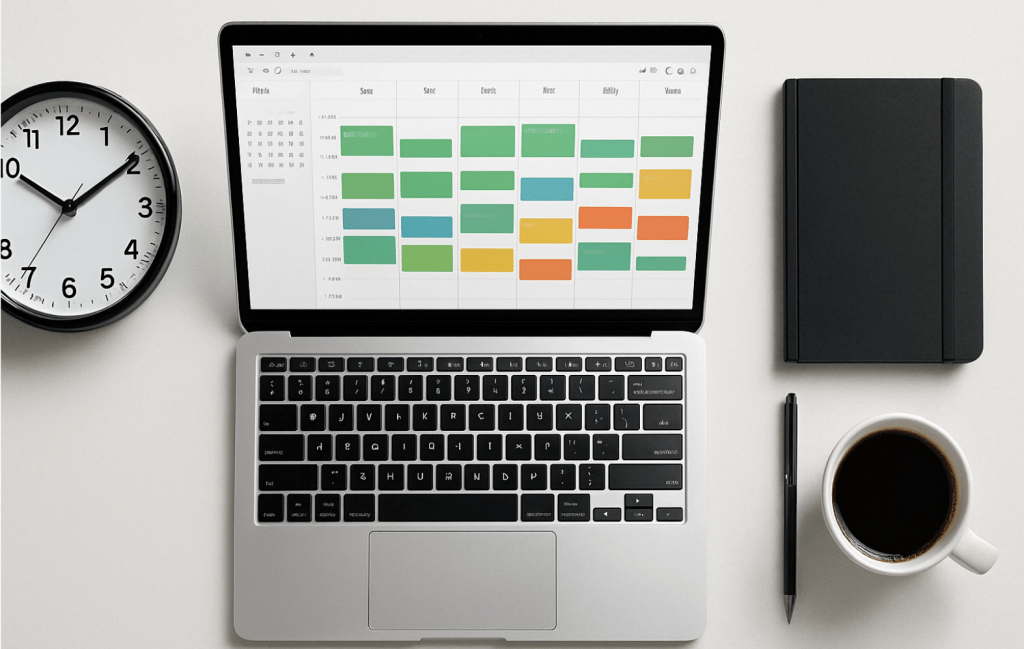
    Time blocking is the practice of dividing your day into discrete chunks of time, each dedicated to a specific task or category of work. Instead of keeping an open-ended to-do list that gets endlessly carried over, you assign specific tasks to specific time slots.

    For example, 9:00–11:00 AM might be for writing a report, 11:00–11:30 AM for email triage, and 1:00–2:00 PM for meetings. The beauty lies in the simplicity: focus on one thing at a time, without guilt about everything else.

    Unlike multitasking, which splits your focus and burns mental fuel fast, time blocking fosters deep work—intense concentration on one meaningful task at a time.


    Why Time Blocking Works (Backed by Psychology)

    Ever notice how a task expands to fill the time you give it? That’s Parkinson’s Law in action. Time blocking flips this law on its head. By putting boundaries around a task, you force yourself to work smarter and with more urgency.

    Plus, time blocking reduces decision fatigue. Instead of deciding in the moment what to do next (and risking a doom scroll instead), you follow your pre-decided plan like a GPS for your day.


    Types of Time Blocks You Can Use

    To make time blocking practical, think of your schedule like a Lego set. Here are the main block types you’ll use:

    • Deep Work Blocks – Reserved for focused, high-impact work like writing, strategic thinking, or coding. No emails, no Slack, no phone.
    • Admin Blocks – Knock out repetitive tasks like responding to emails, filing documents, or updating spreadsheets.
    • Buffer Blocks – Leave room for the unexpected: overflows, quick calls, or simply breathing room between intense sessions.
    • Personal Blocks – Don’t forget lunch, movement, or school runs. Life outside of work deserves structure too.
    • Theme Days – Dedicate entire days to one type of task, like “Meeting Monday” or “Content Friday.” Great for freelancers or team leads.

    How to Set Up a Time Blocking System That Works

    You don’t need to be a Type-A planner with color-coded markers to start time blocking. Here’s a simple roadmap:

    1. Audit Your Time
      For one day, track how you actually spend your time. You might be shocked how often “quick email checks” turn into Instagram detours.
    2. Define Priorities
      Identify your high-leverage tasks—the 20% that brings 80% of your results. Block time for these first.
    3. Choose Your Tools
      Start with Google Calendar, Notion, or a good old-fashioned planner. The best tool is the one you’ll actually use.
    4. Design Your Ideal Week
      Use recurring blocks where possible. Add deep work in the morning if that’s your peak energy time.
    5. Test and Adjust
      Life isn’t static. Treat your calendar like a working draft, not a prison sentence. Adjust weekly.

    Tools & Templates for Better Blocking

    A few tools that make time blocking ridiculously easy:

    • Google Calendar: Set recurring events, color-code blocks, and sync across devices.
    • Sunsama or Motion: Productivity apps that integrate task lists with time blocking.
    • Notion: Great for pairing your weekly planning with notes, goals, and project tracking.

    Bonus Tip: Create a printable weekly template to plan blocks every Sunday evening. Think of it as a ritual to prime your week for success.


    Avoid These Common Pitfalls

    Even a brilliant method like time blocking can backfire if you fall into these traps:

    • Overblocking: Packing every hour from 8 to 8 leaves no room for flexibility—and invites burnout.
    • Unrealistic Time Estimates: Always overestimate how long things take. Tasks expand. Life happens.
    • Skipping Breaks: You’re not a robot. Schedule short resets to boost your focus.
    • Ignoring Energy Levels: Match tough tasks with peak energy. Don’t schedule brainstorming after lunch if that’s your nap zone.

    Real-Life Example: A Day in a Time-Blocked Life

    Let’s look at an example for a working professional:

    Tuesday

    • 7:00–8:00 AM: Morning routine & family breakfast
    • 8:00–10:00 AM: Deep Work – Presentation prep
    • 10:00–10:30 AM: Break & walk
    • 10:30–12:00 PM: Client meetings
    • 12:00–1:00 PM: Lunch & recharge
    • 1:00–2:30 PM: Admin & follow-ups
    • 2:30–4:00 PM: Project planning
    • 4:00–4:30 PM: Buffer block
    • 5:00 PM onward: Workout, dinner, downtime

    Suddenly, your day has rhythm. You move with intention, not reaction.


    Level Up: Advanced Time Blocking Techniques

    • Time Boxing: Add a deadline to each block. “I’ll spend 45 minutes on this task—then I’m done.”
    • Batching: Group similar tasks to minimize context switching.
    • Weekly Reviews: Reflect on what worked, what didn’t, and adjust next week’s blocks.
    • Theme Days: Apply a broad theme to each day of your week. Helpful for solopreneurs or creators.

    Final Thoughts: Time Blocking Is Self-Respect in Action

    Time blocking isn’t about being rigid. It’s about being intentional. It’s a tool that helps you say yes to what matters and no to distractions.

    When you assign your hours with purpose, you move from scattered to strategic. From overwhelmed to in control.

    So, here’s your challenge: block just tomorrow. No need to over-engineer it. Choose your top three tasks and give them each a home on your calendar. Then show up.

    Because productivity isn’t about doing more — it’s about doing what matters, on purpose.
  • The Role of Minimalism in Achieving Work-Life Balance

    The Role of Minimalism in Achieving Work-Life Balance


    🌀 The Chaos We Call Balance

    You wake up, check emails before your feet hit the floor, rush the kids to school, sit through back-to-back Zoom calls, reply to Slack messages over lunch, manage a project milestone, and then, somehow, find yourself answering one last email in bed at 10:47 p.m.

    Sound familiar?

    For many professionals, balance feels more like juggling chainsaws than walking a tightrope. We add productivity hacks, new calendar apps, and time-saving gadgets—yet our schedules get fuller, our energy thinner, and our patience shorter.

    But what if the key to true work-life balance wasn’t more—but less?

    Welcome to the power of minimalism.


    ⚖️ What Work-Life Balance Actually Means

    Let’s clear something up: work-life balance isn’t about perfectly dividing your time between your job and personal life. It’s about intentional living—devoting your energy to what truly matters and filtering out the rest.

    Balance isn’t a 50/50 split.

    It’s:

    • Saying no to unnecessary meetings so you can say yes to dinner with your family.
    • Logging off when your brain needs rest, not just when your inbox is empty.
    • Letting go of “shoulds” in favor of what aligns with your values.

    And that’s where minimalism steps in—not as a trend, but as a compass.


    🔍 Minimalism: The Productivity Power-Up

    Minimalism is often misunderstood. It’s not about owning 10 things or living in a blank white room. It’s about clarity, focus, and removing the excess that clouds your judgment and steals your time.

    In a professional context, minimalism means:

    • Fewer priorities = Better focus
    • Less noise = Better thinking
    • Simpler systems = Smoother execution

    Research shows we make over 35,000 decisions a day. Every item on your desk, app on your phone, or tab in your browser adds to cognitive load. Minimalism reduces decision fatigue—leaving your mental energy for things that matter.


    🧠 Practical Applications at Work

    Here’s how minimalism works its magic at the office (or your kitchen table, if you’re working remotely):

    1. Declutter Your Calendar

    If your calendar looks like a game of Tetris, it’s time for a reset. Cut out recurring meetings that serve no real purpose. Ask: Does this need to happen? Could it be handled asynchronously?

    2. Single-Task Like a Pro

    Multitasking is a myth. Studies show it reduces productivity by up to 40%. Use time-blocking to focus on one task at a time. Tools like Pomodoro timers or apps like Forest can help you stay locked in.

    3. Apply the 80/20 Rule

    Chances are, 20% of your efforts yield 80% of your results. Identify high-impact tasks and ruthlessly prioritize them. Let go of the “busy work.”

    4. Master Email Minimalism

    Inbox zero is overrated. Check email 2-3 times a day—set a timer. Use labels, templates, and filters. Your inbox should work for you, not the other way around.


    🏡 Practical Applications at Home

    Now let’s bring that clarity into your personal life—where it really matters.

    1. Set Tech Boundaries

    Just because your phone is nearby doesn’t mean you need to be on-call. Create work shutdown rituals. For example: no emails after 7 p.m. or no screens in the bedroom.

    2. Simplify Your Space

    Visual clutter leads to mental clutter. Streamline your home setup—less décor, fewer distractions. A clear environment fosters a calm mind.

    3. Schedule Nothing

    Yes, you read that right. Leave blank space in your week. Time for spontaneity, reflection, even boredom. That’s when creativity—and deep connection—flourish.

    4. Be Present, Not Perfect

    You don’t need 5 hours of family time every day. You need 10 minutes of undivided attention. Trade quantity for quality. Put the phone away. Play a board game. Ask meaningful questions.


    🧭 The Minimalist Mindset: A Mental Shift

    Minimalism isn’t just about systems—it’s a philosophy.

    From FOMO to JOMO

    Let go of the Fear of Missing Out. Embrace the Joy of Missing Out. Say no to things that don’t align. Your energy is a finite resource—spend it wisely.

    The Power of “No”

    Every “yes” is a “no” to something else. Learn to say no to last-minute meetings, extra responsibilities, and social obligations that drain you.

    Self-Reflection is the Anchor

    Review your week. What brought you energy? What drained it? Use a minimalist journal to track your focus and adjust course. Minimalism requires regular realignment.


    👨‍👩‍👧‍👦 Real-Life Mini Case Studies

    Let’s make it real:

    • The Project Manager: Trimmed her meeting load by 30%—focused on strategic tasks, and finally had time to coach her team. Result? Less stress, better results.
    • The Young Family: Went screen-free after 7 p.m. for one week. Kids slept better, parents connected more. It became their new norm.
    • The Entrepreneur: Cleared his workspace, removed 70% of unused apps, and started time-blocking. He called it the most productive month of his career.

    These aren’t unicorns. They’re people like you—choosing less, and gaining more.


    🎒 Your Minimalist Work-Life Starter Pack

    Here’s how to start today:

    Declutter Your Digital Life
    — Delete unused apps
    — Unsubscribe from 10 newsletters
    — Use one to-do list app only

    Audit Your Calendar
    — Eliminate one low-value meeting
    — Add a 30-minute “deep work” block daily
    — Schedule a 24-hour window with no social plans

    Simplify Your Habits
    — Create a consistent morning ritual
    — Turn off phone notifications
    — Keep a “done” list to celebrate progress

    Bonus Tools to Try:

    • Notion: For streamlined project and task management
    • Minimalist: A clean, distraction-free to-do app
    • Sunsama: Plan your day with intention
    • Forest: Stay focused by planting virtual trees 🌱

    Final Thoughts: Simplicity Is Sustainable

    Work-life balance isn’t about perfection—it’s about presence. And minimalism helps you get there.

    By cutting the excess, you make space for what matters: deep work, meaningful rest, genuine connection, and peace of mind.

    Start small. Say no once. Clear one drawer. Remove one app. You’ll be amazed how quickly clarity compounds.


    📥 Want a quick win?
    Download your free checklist: “10 Minimalist Habits for a Balanced Work-Life”


    🗨️ What’s one thing you’ll simplify this week? Drop a comment and let’s inspire each other.

  • The One-Minimalist-Task Method: Boosting Productivity Without Overload

    The One-Minimalist-Task Method: Boosting Productivity Without Overload

    Introduction: The Productivity Paradox

    Picture this: You wake up, coffee in hand, staring at a to-do list that seems longer than a novel. You’ve read every productivity book, tried the latest apps, and still—somehow—your most important work keeps slipping through the cracks. Sound familiar?

    The modern approach to productivity is broken. We pile on tasks, chase endless efficiency hacks, and juggle multiple priorities, only to end up overwhelmed and exhausted. More work does not equal more results. In fact, it often leads to less focus, more stress, and diminished impact.

    Enter the One-Minimalist-Task Method—a counterintuitive yet powerful approach designed to cut through the noise, eliminate overwhelm, and make productivity effortless. The idea? Do one mission-critical task per day—intentionally, deeply, and without distraction.

    The Problem with Traditional Productivity Hacks

    Most productivity techniques focus on doing more—optimizing workflows, time-tracking, and squeezing every ounce of efficiency out of the day. The result?

    • Task overload: Endless to-do lists lead to decision fatigue and analysis paralysis.
    • Shallow work: Rapid task-switching prevents deep focus and creativity.
    • Burnout: Chasing high-output days without meaningful progress leads to exhaustion.

    Instead of piling on more, the One-Minimalist-Task Method removes the clutter and allows you to focus on what truly matters.

    What is the One-Minimalist-Task Method?

    At its core, this method is about ruthless prioritization. Instead of a never-ending to-do list, you focus on one high-impact task per day—the task that, if completed, moves the needle the most.

    Why does this work?

    • Eliminates decision fatigue: No more debating which task to start first.
    • Enhances deep work: Fewer distractions mean higher quality output.
    • Creates momentum: Finishing one significant task builds confidence and motivation.
    • Reduces stress: A clear focus prevents overwhelm and boosts mental clarity.

    The key difference between this method and traditional approaches is that it prioritizes depth over breadth. Instead of half-completing ten tasks, you fully complete one that truly matters.

    How to Implement the One-Minimalist-Task Method

    1. Identify Your Keystone Task

    Every day, ask yourself: What is the one task that will make everything else easier or unnecessary? This is your keystone task—the singular priority that aligns with your bigger goals.

    If you’re an entrepreneur, this might be a high-value sales call. If you’re a writer, it could be drafting a key chapter of your book. The goal is clarity—knowing exactly what needs your full attention.

    2. Time-Block Like a Pro

    Dedicate uninterrupted time to this task. Whether it’s 90 minutes in the morning or a focused block in the afternoon, treat it like an unmissable appointment.

    A well-planned time block ensures that your most important task isn’t squeezed between distractions but given the mental space it deserves.

    3. Eliminate Distractions Ruthlessly

    Distraction is the enemy of deep work. Before starting, do the following:

    • Turn off notifications on your phone and computer.
    • Close unnecessary tabs and applications.
    • Use a distraction blocker like Freedom or Cold Turkey.
    • Let others know you are unavailable during this time.

    The fewer interruptions, the higher your productivity.

    4. Say No to Everything Else (For Now)

    While other tasks may be important, they are not the priority. Defer, delegate, or delete anything that doesn’t contribute to your keystone task.

    Instead of feeling guilty about an unfinished to-do list, recognize that one task done well beats ten tasks half-done.

    5. Use the “Finisher’s High” to Build Momentum

    Completing one high-impact task triggers a sense of accomplishment, which fuels motivation for the rest of the day.

    If time allows, you can tackle secondary tasks with less cognitive resistance. But if your keystone task was completed, you’ve already won the day.

    The Science Behind Doing Less to Achieve More

    • Deep Work Beats Shallow Work: Research by Cal Newport shows that focused, undistracted work produces exponentially better results than multitasking.
    • The Zeigarnik Effect: Unfinished important tasks stay in our minds, keeping us engaged and motivated.
    • Cognitive Load Theory: Reducing unnecessary tasks conserves mental energy for meaningful work.

    A 2019 study from the University of California found that the average worker switches tasks every three minutes and five seconds, significantly reducing overall efficiency. Single-tasking is the antidote to this modern problem.

    Adapting the Method to Different Work Styles

    • For corporate professionals: Use this method alongside scheduled meetings and daily responsibilities by ensuring your keystone task aligns with key objectives.
    • For entrepreneurs/freelancers: Prioritize revenue-generating or business-growth tasks to drive sustainable success.
    • For busy parents: Apply this approach to personal productivity—whether it’s a workout, meal prep, or quality time with family.

    Even in a highly reactive job, you can apply this method by ensuring one block of time each day is reserved for your most important work.

    Common Objections and How to Overcome Them

    1. “What if I have more than one important task?” Prioritize. If everything is a priority, then nothing is. Rank your tasks and pick the most impactful one.

    2. “What if unexpected work comes up?” Life happens. But the key is to structure your day so that your keystone task gets attention before interruptions arise.

    3. “Won’t this slow me down?” No. In fact, it speeds you up because you spend less time context-switching and more time in deep focus.

    Conclusion: Productivity as a Mindset, Not a To-Do List

    True productivity isn’t about cramming more into your day—it’s about doing fewer things with greater impact. The One-Minimalist-Task Method helps you work smarter, not harder.

    By focusing on one high-impact task per day, you create more meaningful results with less stress.

    Challenge: Try this method for a week. Each day, choose one key task, execute it with full focus, and experience the difference. Productivity doesn’t have to be overwhelming—sometimes, less really is more.

  • Minimalist Meetings: How to Cut Time While Improving Results

    Minimalist Meetings: How to Cut Time While Improving Results

    Meetings often feel like a necessary evil.
    As a project manager, you’ve likely sat through countless hours of discussions that felt longer than they needed to be.
    But what if you could cut meeting time in half—and still get better results?

    The answer lies in minimalist meetings.
    Strip away what’s unnecessary, focus on essentials, and watch productivity soar.

    Why Do Meetings Drag On?

    Before fixing the problem, you need to understand where it comes from:

    • No clear agenda: People talk in circles without direction.
    • Too many participants: Decision-makers get lost in a crowd.
    • Lack of defined outcomes: Meetings end without concrete next steps.
    • Repetition and status updates: Valuable time wasted on information better shared via email.

    Ask yourself:
    How many meetings in your calendar suffer from one—or all—of these?

    The Minimalist Meeting Framework

    Minimalism is about doing less, but better.
    Here’s how you can apply it to your meetings:

    1. Set a Single, Clear Objective

    Every meeting should have one goal.
    Not three.
    Not five.

    Example:
    Instead of calling a meeting to “discuss project updates and potential risks,” focus only on “identifying top 3 risks blocking project progress.”

    Ask yourself before scheduling:
    What decision or action do I want from this meeting?

    If you can’t answer clearly, you probably don’t need the meeting.

    2. Keep Attendees Lean

    Only invite people who directly contribute to the meeting’s objective.

    • Decision-makers
    • Key stakeholders
    • Subject matter experts

    Exclude “just-in-case” participants.
    If someone needs to be informed, send them a summary afterward.

    I once cut a 12-person weekly status call down to 4 people.
    Result?
    Discussions became sharper, decisions faster, and nobody complained about missing an unnecessary hour.

    3. Limit Duration Strictly

    Most meetings expand to fill the scheduled time.
    Challenge this by:

    • Defaulting to 15-minute slots for check-ins.
    • Capping decision-making sessions at 30 minutes max.
    • Ending immediately when the objective is achieved—don’t fill remaining time.

    Try timing your meetings for one week.
    You’ll notice how much fat can be trimmed.

    4. Use Pre-Reads for Context

    Stop using meetings to read slides or share basic updates.

    Instead:

    • Prepare short pre-reads (1-2 pages max).
    • Distribute them at least 24 hours in advance.
    • State clearly: “We won’t review this in the meeting. Please read beforehand.”

    This forces people to show up informed and ready to contribute—not passively listen.

    5. Assign a Timekeeper

    Meetings often derail because nobody’s responsible for keeping things on track.

    Assign one person (not necessarily you) to:

    • Watch the clock.
    • Cut off tangents politely.
    • Remind everyone of the objective.

    Even rotating the role among team members keeps engagement high and prevents drift.

    6. End with Concrete Actions

    A meeting without clear outcomes is wasted time.

    At the end, quickly summarize:

    • Decisions made
    • Action items with owners
    • Deadlines

    Send this summary immediately.
    You can use a simple format like:

    Decision/ActionOwnerDue Date
    Approve final project timelineAnnaFriday
    Confirm vendor availabilityMarkusWednesday

    Don’t assume people will “remember” next steps.
    Spell them out.

    Replace Meetings with Asynchronous Tools

    Many meetings exist just to share information.

    Ask yourself:

    • Can this update be sent via email?
    • Can I post this in a project management tool?
    • Would a short Loom video or voice message suffice?

    Asynchronous communication saves everyone time.
    Use meetings only when real-time discussion is absolutely necessary.

    Ask: Do We Even Need This Meeting?

    Before sending out invites, pause.

    Consider:

    • What’s the cost of this meeting in total man-hours?
    • What happens if I cancel it?
    • Can we achieve the same goal in writing?

    Be ruthless.
    Cancel standing meetings if they no longer serve a purpose.

    How Minimalist Meetings Benefit Project Managers

    When you cut down meeting clutter, here’s what you gain:

    • Faster decisions: Clear objectives and lean attendance accelerate outcomes.
    • Higher engagement: Shorter, focused meetings keep participants alert.
    • More time for deep work: Less time spent in back-to-back calls.
    • Improved accountability: Clear action items prevent confusion post-meeting.

    In one project I managed, we reduced standing meetings by 40%.
    Team satisfaction rose, and we completed milestones ahead of schedule.

    Ready to Simplify?

    Look at your calendar right now.

    Which meetings can you:

    • Cancel?
    • Shorten?
    • Restructure with clear objectives and lean participants?

    Try minimalist meetings for one month.
    Measure the impact—not only on your project’s progress but also on your team’s energy and focus.

    What’s stopping you from making your meetings more efficient today?

  • From Planning to Execution: Productivity Tools That Made an Impact in 2024

    From Planning to Execution: Productivity Tools That Made an Impact in 2024

    As someone balancing the demanding role of a project manager in telecommunications with the joys and responsibilities of family life, I’ve spent 2024 experimenting with productivity tools that could help me stay on top of everything. This year, I found five tools that not only streamlined my workflow but also gave me back precious time for what truly matters. Here’s a personal look at how these tools impacted my productivity and why they might work for you too.


    1. Why Productivity Tools Matter More Than Ever

    2024 brought a new wave of challenges in managing work and personal commitments. Hybrid work models are more common, projects are increasingly complex, and finding time for meaningful focus can feel like an uphill battle. These productivity tools didn’t just save me time—they helped me work smarter, stay organized, and reduce the stress that comes with a packed schedule.

    Let’s dive into the five tools that made the biggest difference for me this year.


    2. Tool Reviews
    Notion: My Digital Brain
    • Overview: Notion is my go-to for managing projects, ideas, and personal notes. It’s where everything starts and ends. I’ve used it to build dashboards for project tracking, manage my blog content, and even organize family logistics.
    • What’s New in 2024: This year, Notion’s AI updates became game-changers. Breaking down complex tasks or generating quick outlines for reports is now effortless. It’s like having an extra team member ready to brainstorm or tidy up your workflow.
    • How I Use It: I’ve created templates for recurring tasks like meeting agendas and project summaries. One feature I particularly love is the database automation—it keeps everything connected, so I’m never scrambling for missing details.
    RescueTime: A Reality Check on Time Usage
    • Overview: RescueTime has been my silent accountability partner. It tracks how I spend my hours across devices and gives me insights that are both humbling and motivating.
    • What’s New in 2024: The new AI-powered focus mode is brilliant. It analyzes my work patterns and suggests the best times for uninterrupted deep work. Plus, the alerts for screen time have helped me cut down on unnecessary distractions.
    • How I Use It: At first, I was shocked by how much time I lost to small distractions. But now, RescueTime helps me prioritize by showing me exactly where I can reclaim hours. I schedule my most critical tasks during my identified “focus zones.”
    Grammarly: My Writing Wingman
    • Overview: Whether it’s sending a concise email or drafting a detailed project update, Grammarly has been my secret weapon for clear and professional communication.
    • What’s New in 2024: The tone-suggestion feature has been particularly useful this year. It helps me strike the right balance in emails—whether I need to sound collaborative, authoritative, or empathetic.
    • How I Use It: I’ve integrated Grammarly into every writing platform I use, from emails to blog drafts. It saves me from unnecessary edits and lets me focus on getting the message right the first time.
    Clockwise: Protecting My Focus Time
    • Overview: Clockwise has been a lifesaver for managing my calendar. It doesn’t just help me find meeting slots; it actively protects blocks of time for focused work.
    • What’s New in 2024: The AI-driven scheduling has improved dramatically this year. It syncs beautifully with Slack and Zoom, meaning I don’t have to manually adjust schedules after last-minute changes.
    • How I Use It: I’ve set it to automatically block “focus time” during my peak productivity hours in the morning. Having that dedicated, uninterrupted time has been a game-changer for tackling deep work.
    Todoist: Taming the Task List
    • Overview: Todoist has been my task manager of choice for years, but in 2024, it cemented its place as an irreplaceable tool in my workflow.
    • What’s New in 2024: The collaborative features and smart task suggestions made working with my team easier than ever. It’s also great for personal life—I use it to keep track of errands and even family activities.
    • How I Use It: I rely on Todoist’s “Today” view every morning to organize priorities. Its labels and deadlines help me stay focused, and sharing tasks with team members means everyone is always on the same page.

    3. How These Tools Work Together

    One of the biggest lessons I’ve learned this year is that no single tool can do it all, but together, they create a seamless system. Here’s how I combine them:

    • Planning: I list and prioritize tasks in Todoist.
    • Focus: Clockwise blocks my calendar so I can work on those tasks without interruptions.
    • Analysis: I use RescueTime to ensure I’m staying on track and to adjust my schedule if needed.
    • Polishing: Grammarly makes sure my communications and reports are clear and effective.
    • Organization: Everything else—notes, brainstorming, and project tracking—lives in Notion.

    This setup has made me feel more in control of my time than ever before. I’m not juggling multiple apps aimlessly; they’re all working together toward the same goal.


    4. Final Thoughts

    2024 has been the year of refining how I work, and these tools have played a huge role in making that happen. They’ve allowed me to streamline my processes, focus on what matters, and even carve out more time for my family.

    If you’ve been feeling overwhelmed or like you’re constantly chasing deadlines, I can’t recommend these tools enough. Try them out, experiment with how they fit into your routine, and watch how they transform the way you work.

    What about you? Have you discovered any tools that changed the game for your productivity this year? Let me know in the comments — I’d love to hear your experiences!